Key Takeaways
A printed roll is not finished until the label shape, waste, slit width, winding direction and delivery format are approved.
The seven core stages are preflight, optional protection, registration, contour cutting, matrix removal, slitting and final rewinding or sheeting.
Not every job needs every stage, but changing the sequence can affect registration, cut depth and waste stripping.
Quality checks should follow the web so a defect is found before more material and labor are added.
Select a VICUT configuration from the required finished output and real job mix, not from a machine name alone.
Turning a printed roll into finished labels normally requires seven connected steps: preflight the job, add any required laminate, register the print, contour-cut the labels, remove the waste matrix, slit the web and rewind or sheet the output. Each stage changes the input condition for the next one, so a stable workflow must be tested as a complete chain rather than as isolated machine features. The VICUT digital label finishing solution can be used as the starting point for mapping those stages to equipment.
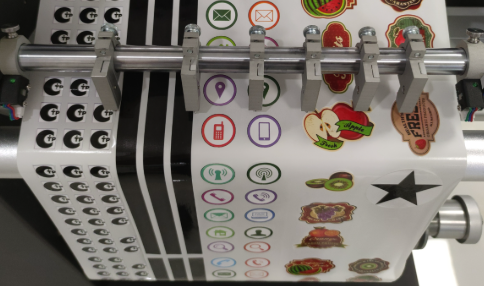
The Seven-Step Workflow
1.Preflight → 2. Laminate or enhance → 3. Register → 4. Contour cut → 5. Remove matrix → 6. Slit → 7. Rewind or sheet and inspect
| Stage | Primary purpose | Approval question |
|---|
| Preflight | Match print, cut and output data | Are the file and roll specification correct? |
| Lamination | Add specified surface protection or finish | Is the final construction stable and readable? |
| Registration | Align cut paths to the printed web | Does alignment hold across the job? |
| Contour cutting | Create the label shape and depth | Do labels peel without liner damage? |
| Matrix removal | Strip surrounding face waste | Does the matrix run without repeated breaks? |
| Slitting | Divide the web into finished lanes | Are width and edge quality correct? |
| Rewind/sheet | Create the delivery format | Will the output run in the next process? |
The workflow is different from a single digital cutting operation. Review digital cutting versus die cutting when deciding whether the job needs a physical die, a digital cutting path or a combination of finishing methods.
Step 1: Preflight the Print and Cut Files
Confirm finished label size, bleed, contour paths, lane layout, repeat length and registration marks. Print and cut files must share the same geometry and scale. Check fonts, variable data and barcodes before adding finishing cost to the roll. For roll-based label production, compare the required workflow with the VICUT roll label die cutting machine range before selecting a model.
Inspect the printed web for color, curing or toner adhesion, missing marks, wrinkles and splices. Record roll width, diameter, winding direction and job sequence. A file error discovered after lamination and cutting wastes more than the print alone.
Step 2: Apply Laminate or the Required Finish
Not every job needs laminate. Use the specified protection or appearance based on service exposure and the approved material system. When film laminate is required, it is normally applied to the continuous printed web before final contour cutting so the laminate follows the finished label edge. The guide When Should Labels Be Laminated Before Cutting? explains how lamination changes thickness, stiffness, registration and cutting conditions.
Check bubbles, silvering, wrinkles, tension and lateral position. Confirm that registration marks remain readable and allow any documented stabilization required by the print or film supplier. For equipment planning, the VICUT laminating and foiling range should be treated as a separate module unless the quoted label cutter specifically documents inline lamination. The finished construction—not the unlaminated stock—must be used for the cutting test.
Step 3: Register the Printed Web
The cutter reads printed reference marks with a sensor or camera, then aligns the vector cut path to the measured print position. Supported systems may compensate for origin, rotation or scale. Codes can also identify a job on configured equipment, but job retrieval and geometric alignment are separate functions. See How Do Registration Marks Work in Label Cutting? for the distinction between mark detection, job identity and geometric correction.
Watch the first detection cycle and the behavior after a stop or splice. Mark-reading success on one repeat does not prove that the web will track and register across a production roll.
Step 4: Contour Cut to the Correct Depth
Most pressure-sensitive roll labels use kiss cutting: the blade passes through laminate, facestock and adhesive while leaving the release liner functional. Through cutting is used only when the job requires separated pieces or another fully cut output. The kiss cutting versus die cutting guide provides a separate explanation of the cut-depth decision.
Establish blade and force settings on the final construction. Peel labels from different positions and inspect the liner. Check small corners, circles, thin borders and long repeats because they reveal different errors. Do not raise force merely because the matrix is difficult to remove; diagnose cut depth and geometry separately.
Step 5: Remove the Waste Matrix
Matrix removal strips the surrounding face material while finished labels remain on the liner. Narrow gaps, acute corners, small labels, elastic films and aggressive adhesive can make the waste web unstable. It should be evaluated together with the label slitting and rewinding workflow, because waste tension and finished-roll handling can affect the same job.
Observe where a break begins. If failures repeat at the same feature, inspect the contour and waste geometry. If failures vary across the roll, examine cut consistency, web alignment and tension. Collect the waste safely and include restart time in real digital label finishing throughput measurements.
Step 6: Slit the Web Into Finished Lanes
A printed roll may carry several lanes across its width. Slitting separates them lengthwise according to the customer’s finished-roll specification. Set blade positions from approved lane widths and verify the first output before running the complete job.
Inspect edges for roughness, adhesive buildup and width drift. Slitting is different from contour cutting: the contour defines each label, while the slitter defines the web or roll width.
Step 7: Rewind or Sheet, Inspect and Pack
Rewind each lane onto the specified core with the correct label orientation and face-in or face-out direction. Control roll build so edges remain aligned and rolls do not telescope. Confirm labels per roll, web length or maximum outside diameter and identify permitted splices.
If the customer needs sheets rather than rolls, a roll-to-sheet stage cross-cuts the web to the approved length. The VICUT RS350F roll-into-sheet cutter is documented as an inline or independent option; it does not mean every cutter sheets output automatically. Compare the finished-format decision in Roll-to-Roll vs Roll-to-Sheet Label Cutting before confirming the output specification.
Inspect first, middle and final samples. Verify registration, peel, liner condition, matrix result, slit width, winding direction, quantity and packing label before release.
Build Quality Checks Into the Flow
| Checkpoint | Stop the job when… |
|---|
| After print/preflight | Marks, scale, artwork or roll specification is wrong |
| After lamination | Wrinkles, bond or mark readability is unacceptable |
| After cutting | Registration, peel or liner condition fails |
| During matrix removal | Breaks repeat or labels lift |
| At final output | Width, winding, quantity or roll build is wrong |
Finding a defect early protects downstream time and material. Keep approved samples and settings with the job record so repeat work begins from a known baseline.
Match the VICUT Configuration to the Workflow
The VICUT digital label finishing solution and roll label die cutting machine range show several configurations. The VR320 label die cutter, for example, documents multiple inline finishing functions. Features remain model- and option-specific.
Send VICUT the printed roll, artwork, construction, required operations and finished-output specification. Ask for a workflow diagram and sample test showing which stages are inline, optional or separate.
Frequently Asked Questions
Is a printed roll ready to use without finishing?
Sometimes pre-cut stock is printed and ready, but continuous printed stock normally needs shape cutting and a defined output format.
Must lamination happen before contour cutting?
Usually when a continuous protective film must follow the label edge, but not every label requires laminate. Test the intended sequence.
What is the difference between matrix removal and slitting?
Matrix removal strips waste around labels. Slitting divides the web into narrower lanes.
Can all seven steps run on one machine?
Some configurations integrate several stages; others use separate equipment. Verify the exact quoted model and options.
Map Your Label Finishing Line With VICUT
Send VICUT the printed roll, cut file, material construction, batch pattern and final delivery specification. The team can map which steps should be inline, optional or handled on separate equipment, then identify a suitable digital label finishing configuration. Contact VICUT to turn the seven-stage workflow into a test plan and itemized configuration for your actual labels.
 vicutcnc@cncvicut.com