Key Takeaways
Roll-to-roll finishing rewinds the converted web, making it the natural starting point when labels will feed a dispenser, applicator or another roll process.
Roll-to-sheet finishing cuts the web into defined sheets, which can simplify counting, packing, sample distribution and manual use.
The cutting method and output format are separate decisions. A machine may contour-cut labels and then rewind them, sheet the web, or support an optional downstream sheeter.
Choose from the customer’s next operation: application method, core size, winding direction, sheet length, pack quantity and traceability.
Test the full path from printed roll to packed output; a clean contour cut alone does not prove a workable finishing line.
The difference between roll-to-roll and roll-to-sheet label cutting is the finished format. Roll-to-roll systems keep labels on a continuous web and rewind them after cutting. Roll-to-sheet systems cross-cut that web into individual sheets or strips. If labels enter an automatic applicator, a finished roll is usually required; if they are packed as sets, proofs or hand-applied sheets, roll-to-sheet output may be easier to handle.
Roll-to-Roll vs Roll-to-Sheet: Quick Comparison
| Question | Roll-to-roll | Roll-to-sheet |
|---|
| Final output | Rewound label roll | Individual sheets or defined strips |
| Typical next step | Dispenser, applicator, storage or another web process | Packing, counting, sampling or manual application |
| Key controls | Tension, web guide, matrix removal, slit width, rewind | Registration/mark detection, cross-cut position, sheet length, stacking |
| Order detail to confirm | Core, roll diameter, winding direction, labels per roll | Sheet dimensions, labels per sheet, pack quantity, stack order |
| Main handling risk | Telescoping, uneven tension or wrong wind | Curl, mixed order, inaccurate cross-cut or poor collection |
What Is Roll-to-Roll Label Cutting?
In a roll-to-roll workflow, the printed or blank roll is unwound, registered and contour-cut, after which the waste matrix can be removed and the finished web slit and rewound. Labels stay on the release liner in roll form. This supports downstream web handling and reduces the need to collect individual sheets.
Roll-to-roll does not describe the cutting tool. The machine may use a physical rotary die, digital knives or another cutting technology. Buyers should ask both questions: How is the label contour cut? and What format leaves the machine?
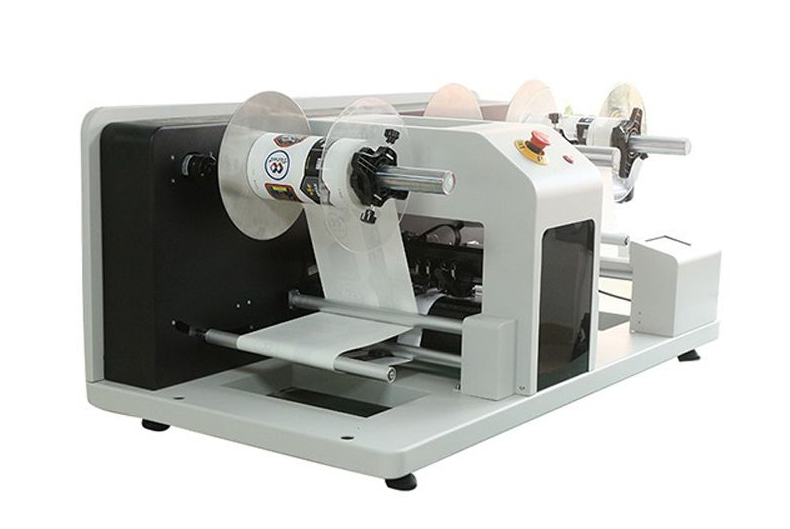
VICUT’s VR30 roll label cutter, for example, is documented as a digital roll-to-roll cutter with automatic contour cutting, separate waste rewinding and finished-roll output. That makes it relevant to short-run labels that must remain on a web, but actual width, file, material and speed requirements must still be checked against the current model specification.
What Is Roll-to-Sheet Label Cutting?
Roll-to-sheet finishing converts a continuous web into specified sheet lengths. The labels may already be contour-cut on the liner before the cross-cut. The result can be a single row strip, a multi-label sheet or another defined length, depending on the job and machine configuration.
This format helps when a customer wants sample packs, promotional sets, manual distribution or a counted sheet quantity. It can also remove the need for a separate manual sheeting step. However, loose sheets introduce their own workflow: collection, curl control, order integrity, packing and sheet-count verification.
The VICUT RS350F roll-into-sheet cutter is documented as an inline option for VICUT digital label cutters or as an independent sheeting device. Treat it as an output module, not as proof that every roll cutter automatically produces sheets.
Choose the Output From the Application Method
Start at the customer’s packing or application line and work backward.
Choose roll output first when:
labels feed an automatic or semi-automatic applicator;
a dispenser presents one label at a time;
another process needs a continuous web;
the purchase order specifies core, winding direction or roll diameter;
storage and shipping are organized by roll.
Choose sheet output first when:
labels are handed out, inserted into kits or packed in small sets;
users peel labels manually from a sheet;
samples or proofs must be separated by job;
the customer specifies labels per sheet or sheets per pack;
a cross-cut step is otherwise performed offline.
Neither format is automatically more professional. The correct format is the one accepted by the next process without rework.
Do Not Confuse Cut Depth With Output Format
Kiss cutting preserves the liner beneath the label; full cutting passes through all layers. Roll-to-roll and roll-to-sheet describe material handling, not cut depth. Most pressure-sensitive roll labels are kiss-cut so the web remains intact. A roll can then be rewound or cut into sheets.
This separation prevents a common specification error: ordering “die-cut sheets” without stating whether each label should peel from a liner or arrive as a fully separated piece. Read the related VICUT guide to kiss cutting versus die cutting before approving the output specification.
Build a Finished-Output Specification
| Specification | Roll output | Sheet output |
|---|
| Finished size | Web width and slit lanes | Sheet width and cut length |
| Quantity | Labels per roll / number of rolls | Labels per sheet / sheets per pack |
| Orientation | Copy position and wind direction | Top edge and packing orientation |
| Handling | Core ID, maximum OD, splice policy | Stack order, curl tolerance, separators |
| Identification | Roll label or job ticket | Sheet/pack label or batch divider |
Also document facestock, adhesive, liner and lamination. Avery Dennison’s liner materials technical guide is a useful reference for understanding that the liner is a functional component of converting and dispensing, not disposable background material. Final settings must still come from the actual laminate supplier and production test.
Test the Complete Finishing Workflow
Run the real printed roll from loading to packed output. For roll-to-roll, inspect registration, matrix stripping, slit edges, rewind tension, roll build and the first and last labels. Mount a finished roll on the intended dispenser or applicator if possible.
For roll-to-sheet, inspect cross-cut position, sheet length, stack order, curl and whether labels remain easy to peel. Count a full pack rather than approving one sheet. Test job changes and recovery after a mark-reading error or stop.
Track usable output, not only machine speed. Time spent correcting a telescoped roll or sorting mixed sheets belongs in the comparison.
Which VICUT Workflow Should You Evaluate?
Use the VICUT roll label cutting range to compare digital finishing configurations, then specify whether you need rewound rolls, slit rolls or sheeted output. Ask for a written workflow diagram showing every included station and option.
For a useful sample test, send VICUT the artwork, printed roll, roll width and diameter, liner construction, required slit lanes, finished core and winding direction, or the required sheet length and pack quantity. That information allows the supplier to evaluate a workflow rather than recommend a machine from a product name alone.
FAQ
Can a roll-to-roll cutter also produce sheets?
Some systems support an inline or optional sheeting module; others require a separate device. Confirm the exact quoted configuration and how sheets are collected.
Are roll labels always for automatic application?
No. Rolls can also support hand application and dispensers, but automatic applicators usually impose stricter core, wind and roll-build specifications.
Is roll-to-sheet the same as a sheet-fed label cutter?
No. Roll-to-sheet starts with a web and cross-cuts it. A sheet-fed label cutter starts with separate sheets and follows contours on those sheets.
Which format costs less?
There is no universal answer. Compare equipment configuration, finishing steps, packing labor, shipping, customer handling and any rework required by the next process.
 vicutcnc@cncvicut.com