Key Takeaways
Slitting divides a wide label web into narrower lanes; rewinding builds those lanes into finished rolls. They are separate operations, even when one machine performs both inline.
Specify the finished roll before selecting equipment: slit width, core ID, maximum roll diameter, winding direction, labels per roll and acceptable splices.
Stable output depends on web guiding, suitable blades, controlled tension and correct core alignment—not line speed alone.
Approve the first, middle and last sections of a roll. A good sample from one position does not prove a stable production run.
Confirm every function against the quoted VICUT model and configuration; slitting, matrix removal and separate rewinding are not universal features.
Label slitting and rewinding convert a printed or blank parent web into narrower, usable label rolls. The web is unwound, guided under controlled tension, slit longitudinally to the required widths and rewound on new cores. The job is successful only when each roll has the correct width, orientation and quantity and can unwind cleanly in the customer’s dispenser, printer or applicator.
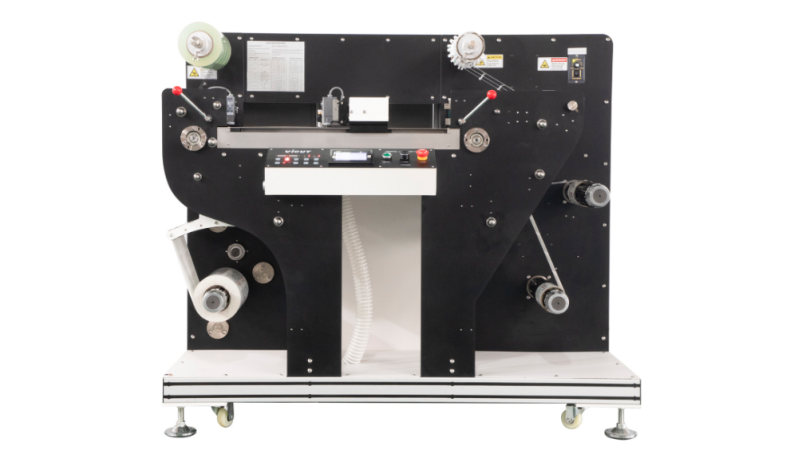
What Are Label Slitting and Rewinding?
Slitting is the machine-direction cut that separates a wide web into narrower webs. It differs from contour cutting, which creates each label shape, and matrix removal, which strips the surrounding waste. Rewinding transfers the processed web onto finished cores; it changes the roll build but not necessarily the web width.
| Operation | What changes | Main control point | Typical failure |
|---|
| Contour or kiss cutting | Label shape in the facestock | Registration and cut depth | Offset contour or damaged liner |
| Matrix removal | Waste around the labels | Peel angle and waste tension | Broken matrix or lifted labels |
| Slitting | Web width and number of lanes | Blade position, guiding and edge quality | Width drift, burrs or adhesive buildup |
| Rewinding | Core, roll direction and roll build | Tension, alignment and torque | Loose rolls, wrinkles or telescoping |
How a Label Slitter-Rewinder Works
Process chart:
Parent roll → unwind → web guide and tension control → optional lamination, contour cutting and matrix removal → longitudinal slitting → separate rewind shafts → inspection and packing
The operator threads the parent roll through the specified path. A web guide controls lateral alignment, the tension system stabilizes the web, and positioned blades create the approved lanes. The separated lanes then wind onto cores. In an integrated line, this can follow lamination, contour cutting and matrix removal; a dedicated slitter-rewinder may receive an already converted web.
VICUT’s VR320 operating manual documents model-specific modes for rewinding, lamination plus rewinding, slitting, and lamination plus slitting. This illustrates why buyers should request the exact web path and included modules for the machine being quoted.
Define the Finished Roll Before the Machine
Begin with the downstream equipment and purchase-order specification, not simply the number of slit rolls.
| Finished-roll item | What to document |
|---|
| Slit width | Nominal width, tolerance and number of lanes |
| Core | Inside diameter, width, material and permitted overhang |
| Roll size | Maximum outside diameter, web length or labels per roll |
| Winding | Face-in/face-out and label orientation, often shown with a diagram |
| Roll build | Edge alignment, hardness expectations and telescoping limit |
| Splices | Whether allowed, maximum number and identification method |
| Packing | Roll sequence, labels, bags, separators and carton quantity |
These details affect shaft selection, blade layout and inspection. If the customer instead needs counted sheets, review the VICUT RS350F roll-into-sheet cutter before specifying the line.
Why Web Tension and Roll Build Matter
Tension is not one universal number. Unwind, process and rewind can be separate zones, and required torque changes with roll diameter. Avery Dennison’s Tension Control technical bulletin explains these zones and feedback devices. Its example values are material-dependent guidance, not universal settings.
The Maxcess/Tidland white paper Controlling Web Tension with Differential Shafts explains how caliper differences can make slit rolls build at different rates. Differential winding can compensate in suitable systems, but shaft design must match the job.
Record an approved recipe for each construction and test starts, stops and roll-diameter changes. Excessive tension can stretch film, mark the liner or create a hard roll; insufficient or uneven tension can produce loose edges, wrinkles or telescoping.
Common Slitting and Rewinding Problems
| Symptom | Check first | Do not assume |
|---|
| Slit width drifts | Web guide, roll alignment, blade position | A sharper blade alone will fix tracking |
| Rough or dusty edge | Blade condition, blade/material match, adhesive buildup | One blade system suits every laminate |
| Telescoped roll | Core alignment, web guiding, tension through the roll cycle | Rewind tension is the only cause |
| Wrinkles | Incoming roll, roller alignment, tension zones and nip | More tension is always the answer |
| One lane is loose | Caliper variation, core fit and winding arrangement | All lanes build identically |
| Labels lift during waste removal | Cut depth, matrix geometry and waste tension | The rewinder is necessarily at fault |
Record the symptom, position in the roll, speed and material lot, then change one controlled variable. Follow the manufacturer’s guarding and blade-handling procedures; only trained personnel should adjust isolated equipment.
Inline or Separate Slitting and Rewinding?
Inline finishing reduces handling when jobs repeatedly need lamination, contour cutting, matrix removal, slitting and rewinding. A separate machine can offer scheduling flexibility, isolate rework and handle rolls that need no contour cutting.
Compare usable output, changeover, inspection access and web-break recovery. The VICUT VR320 digital label die cutter is documented with slitting and separate rewinding, while the VR30 roll label cutter focuses on contour cutting and waste rewinding. These examples do not mean every model includes the same stations.
How to Evaluate a VICUT Label Finishing System
Start with the VICUT roll label cutting range and send a complete job package: artwork, parent-roll dimensions, facestock/adhesive/liner construction, lamination, lane layout, finished cores, roll diameter, winding direction and quantity per roll.
For the acceptance test, measure every lane, inspect edges and cores, compare the beginning and end, and run a finished roll on the intended downstream device. Ask VICUT for a written list of the web guide, slitting units, rewind shafts and optional modules.
FAQ
Is slitting the same as die cutting?
No. Die or contour cutting creates the label shape. Slitting divides the web lengthwise into narrower rolls.
Is rewinding the same as matrix removal?
No. Matrix removal strips waste around the labels. Rewinding collects the finished label web—or the waste matrix—onto a core.
What causes a label roll to telescope?
Common contributors include poor core alignment, web-guiding errors, uneven tension, roll-handling damage and lane-to-lane build differences. Diagnose the full web path before changing tension.
Does every label cutter include slitting and rewinding?
No. Functions vary by model and option package. Verify contour cutting, matrix removal, slitting and finished-roll rewinding separately on the quotation.
What should I send for a slitting and rewinding test?
Send the real roll construction and job file plus required lane widths, core ID, roll diameter or quantity, wind direction, splice rule and downstream application details.
 vicutcnc@cncvicut.com