The right roll die label cutting machine for your production line depends on four factors, in this order of priority: your typical order volume and SKU count, the label material and whether kiss cutting is required, how much automation (registration, job-changeover, inline lamination/slitting) your workflow needs, and your budget for both the machine and its long-term tooling or consumable cost. Startups and small print shops should start with a compact, low-investment digital roll label cutter, mid-size converters need a multi-head machine with automatic registration, and high-volume producers should prioritize throughput and inline finishing over unit price. Matching the machine tier to your actual order profile — rather than buying the cheapest or the fastest option by default — is what determines whether the investment pays back within the first year.
Step 1: Define Your Production Volume and Order Structure
Before comparing specifications, write down two numbers: your average job size (labels per order) and your monthly total volume. These two numbers drive almost every other decision.
Under 5,000 labels per job, high SKU variety — you need fast job changeovers more than raw speed. A compact, entry-level machine is usually sufficient.
5,000–50,000 labels per job, moderate variety — you need a balance of speed and flexibility, typically a multi-head digital die cutter with automatic job recognition.
50,000+ labels per job, repeat SKUs — throughput becomes the priority, and a higher-speed model with more cutting heads and inline processing will lower your cost per label.
Step 2: Confirm Material Type and Kiss-Cutting Requirements
Not every label cutting job is the same. Confirm the following before selecting a machine:
Material: Paper, PP, BOPP, PET, PVC, and other adhesive-backed stock all behave differently under the blade. Confirm the machine's blade type and pressure range match your material list.
Kiss cutting: If your labels need to peel cleanly off a backing liner (stickers, decals, most pressure-sensitive labels), you need a machine built for kiss cutting — this rules out basic flatbed presses and points you toward a rotary-style digital label die cutter.
Full cutting vs. contour cutting: Some jobs require full through-cuts (labels separated completely), while others need precise contour tracking around printed artwork. Confirm the machine's registration system can read your printed marks accurately.
Lamination needs: If your labels require a protective laminate layer before cutting, look for a machine with inline lamination rather than a separate laminator, which adds handling steps and material waste.
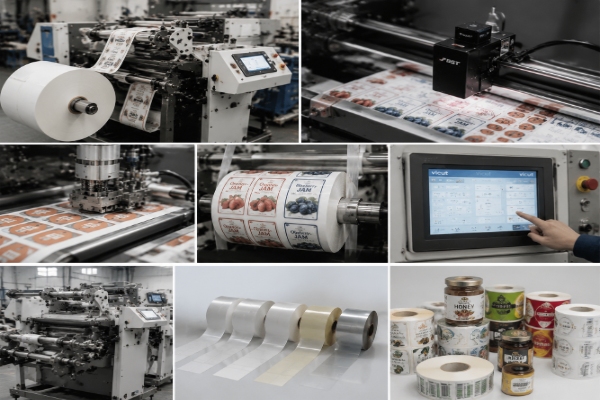
Step 3: Compare Roll Label Die Cutting Machine Tiers
| Production Tier | Typical Order Size | Cutting Heads | Automation Level | Best Fit |
|---|
| Entry / Startup | Under 3,000 labels/job | 1–2 heads | Manual or semi-automatic setup | Sample rooms, DIY label shops, testing new business lines |
| Mid-Volume Converter | 3,000–30,000 labels/job | 2 heads, dual-function | CCD registration, automatic job change | Commercial print shops, small brand-owner in-house production |
| High-Volume Producer | 30,000+ labels/job | Multi-head (4–6) | Full inline lamination, slitting, rewinding | FMCG label suppliers, contract label converters |
Step 4: Evaluate Automation, Registration, and Software Compatibility
Automation level often matters as much as raw cutting speed, because it directly affects labor cost and error rate on the customer's factory floor. When comparing a roll die label cutting machine, check these points:
1.Registration accuracy — does the machine use CCD camera or optical-eye positioning to track printed marks, and how tight is the repeat tolerance?
2.Job-changeover method — can the machine automatically recognize different jobs on the same roll via code reading, or does it require manual reprogramming for every changeover?
3.File compatibility — confirm the software supports common formats (PLT, DXF) and integrates with the customer's existing design or print workflow.
4.Inline processing — lamination, slitting, and rewinding built into a single pass reduce both labor and floor space compared to standalone units.
5.Control interface — a touchscreen panel with straightforward parameter settings reduces training time for new operators, which matters for distributors placing machines with first-time label producers.
Roll Die Label Cutting Machine Buying Checklist
Before finalizing a purchase or recommending a model to a client, confirm the following:
Order volume and SKU variety match the machine's intended production tier
Material list is compatible with the machine's blade and pressure settings
Kiss-cutting capability is confirmed if peel-and-stick labels are part of the product mix
Registration system accuracy meets the tolerance required for pre-printed artwork
Inline lamination, slitting, and rewinding are included or available as options
Warranty terms, consumable parts availability, and technical support response time are documented in writing
A sample cutting test on your actual material has been reviewed before final payment
Shipping, voltage compatibility, and import documentation have been confirmed for international buyers
Machines Matched to Each Production Tier
Entry-level and sample production: a compact digital roll label die cutter with die-cutting plus inline lamination and slitting covers startups and small in-house label production without a large footprint.
Mid-volume commercial shops: a digital label die cutting machine with dual cutting heads and automatic job-change recognition suits customers running frequent small-batch orders.
High-volume converters: a multi-head digital label cutter scaling up to six cutting heads with automated head-distance adjustment and inline sheeting is built for continuous production runs.
Beyond the machine specification itself, it's worth confirming what after-sales support is included — training, response times, and consumable parts availability — since these affect total cost of ownership as much as the purchase price.
Conclusion
Choosing a roll die label cutting machine comes down to matching the machine tier to your actual order volume, material requirements, and automation needs — not to the lowest price or the highest advertised speed. Working through production volume, material and kiss-cutting requirements, automation level, and the buying checklist above should give most distributors, converters, and label producers enough information to shortlist the right category of machine before requesting quotes. For a specification comparison or configuration question specific to your production line, VICUT's team can be reached via the contact page.
FAQ
Q1:How do I know what size roll die label cutting machine I need?
Start from your typical order size and monthly volume, not the machine's top listed speed. A machine sized for high-volume runs is often inefficient for high-mix, low-volume label shops, and vice versa.
Q2:Do I need a machine with kiss-cutting capability?
If any part of your product line includes peel-and-stick labels, stickers, or decals, kiss cutting is a requirement, not an optional feature. Confirm this before comparing price.
Q3:What is the difference between manual and automatic job changeover?
Manual changeover requires an operator to reset cutting parameters for each new job; automatic changeover uses code or mark recognition to switch jobs without manual reprogramming, which reduces downtime on high-mix production lines.
Q4:Can one roll die label cutting machine handle multiple materials?
Most digital rotary label die cutters handle a range of materials — paper, PP, BOPP, PET, PVC — within a defined thickness range. Always confirm the specific material list against the machine's blade and pressure specifications before ordering.
Q5:Is it better to buy from a manufacturer or a distributor?
Buying from the manufacturer directly typically offers better pricing and technical support continuity, while established distributors may offer faster local logistics. For international buyers, confirm warranty coverage, spare parts availability, and response times in writing regardless of which route you choose.
 vicutcnc@cncvicut.com