Key Takeaways
Yes, one sheet cutter can support kiss cutting, full cutting, creasing and perforating when the quoted model has the required tools, software paths and material range.
One machine does not mean every sheet cutter performs every operation, or that all four operations can use the same blade and settings.
Kiss cutting protects the liner; full cutting separates the complete sheet construction; creasing forms a fold line; perforating creates a controlled tear path.
A dual-tool or multi-tool configuration can reduce tool changes, but it does not automatically double production speed.
Buyers should test the complete combination on real sticker sheets, cards and packaging stock before approving a quotation.
Yes—one digital sheet cutter can perform kiss cutting, full cutting, creasing and perforating when the machine is designed with the appropriate cutting and creasing tools. The more important question is whether the quoted model can perform the required combination on your material, in your sheet size and with your intended output. A sheet label cutter may support labels and stickers but not the packaging board you use; another flatbed model may support the four operations but require manual loading or separate tool assignments.
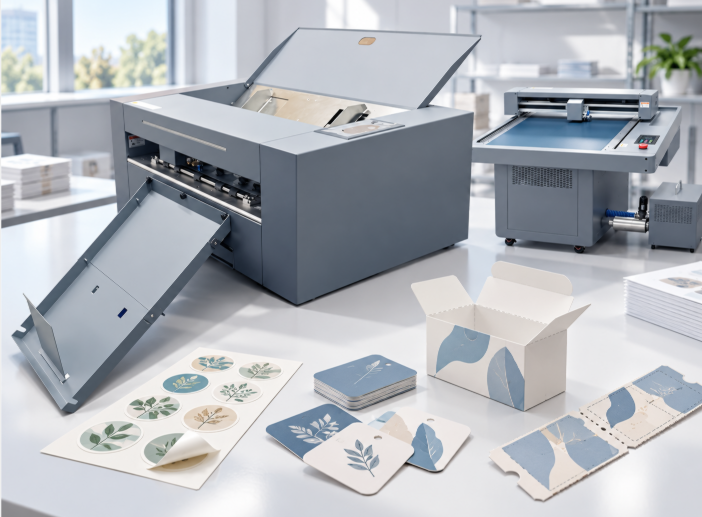
What Each Operation Does
| Operation | What the tool should achieve | Typical output |
|---|
| Kiss cut / half cut | Cut the face material and adhesive while preserving the liner or backing | Peelable labels, stickers and decals on a sheet |
| Full cut / through cut | Cut through the complete material construction | Separated cards, tags, blanks or packaging pieces |
| Creasing | Compress or score a fold line without cutting through the board | Boxes, folders, cards and folded packaging |
| Perforating | Create a controlled series of cuts and bridges | Tear-off tags, coupons, tickets or tear lines |
The distinction matters because a visually clean contour is not enough. A sticker sheet can have a perfect outline but a damaged liner. A packaging blank can be cut accurately but crack on the fold. A perforation can look regular but tear too easily or not tear cleanly at all.
How a Multi-Operation Sheet Cutter Handles the Job
The artwork or production file normally separates operations by color, layer, path type or job instruction. The machine then assigns a blade, creasing wheel or perforating tool to each path and applies a different force, depth or movement. The exact process varies by model.
The VICUT VSC-350Pro automatic sheet cutter is documented with two cutting heads and support for half cut, full cut, perforating and creasing. Its page specifically describes work on pre-printed or blank label sheets, sticker sheets, cardstock and thin packaging materials. That is a model-specific capability statement. It should not be read as proof that every machine in the sheet-cutter market—or every VICUT model—has the same tools or limits.
A static flatbed can also support several operations. VICUT’s FB500Pro/FB700Pro static flatbed page lists full cut, kiss cut, creasing and perforation for that model family. The difference is workflow: a static flatbed places the sheet on a table, while an autofeed sheet cutter is built around repeated sheet transport.
When One Machine Is a Practical Choice
Sticker sheets with a full-cut border
A single sheet may need kiss-cut labels inside a full-cut outer sheet or a through-cut registration border. The file must distinguish the two depths, and the operator must inspect the liner after cutting. Ask whether the quoted machine can process both path types in the same job and how the output is collected.
Cards with creasing or perforation
Cards, tags and coupons may require a crease, a perforated tear-off section or both. The buyer should test folding direction, card grain, coating, toner or ink behavior and the distance between cut and crease lines. A tool that works well on label stock does not automatically produce a good fold on heavier card.
Short-run packaging samples
One digital sheet cutter is attractive for prototypes because the artwork can change without making a conventional die. The test should include the actual board, the smallest tabs, narrow slots, fold lines and waste pieces. Confirm whether the operator can remove the blank without bending or tearing it.
Four Checks That Prevent a Misleading Demonstration
Tool check: Ask for the exact blade, holder, creasing wheel and perforating tool included in the quotation.
Path check: Send a file with all four operations clearly separated and request the returned file or setup notes.
Material check: Use the real liner, adhesive, coating, cardstock or packaging board—not a similar-looking substitute.
Output check: Inspect the face, liner, cut edge, crease, tear path, waste removal and final packing condition.
Run the test on more than one sheet. For an autofeed machine, use the top, middle and bottom of a stack and include a mixed-job or changeover test if that is part of the daily workflow. For a static flatbed, time manual loading, registration and collection. In both cases, record the complete workflow rather than only the cutting movement.
Does a Dual-Tool Head Mean Faster Production?
Not automatically. A second tool can make a mixed cut-and-crease job easier to configure or reduce manual tool changes. Production time still depends on sheet size, path length, number of operations, registration, material handling and output collection. The recent single-head vs dual-head sheet label cutter comparison explains why tool count should be evaluated against the job mix rather than treated as a guaranteed speed multiplier.
The same caution applies to automatic feeding. A feeder can reduce repetitive loading, but curl, static, coatings, double feeds and separated pieces can change the accepted output. Test the material conditions used in the real shop.
How to Specify the Requirement in a Quotation
Write the requirement in operational language:
| Requirement to state | Example question for the supplier |
|---|
| Kiss cut | Can the machine cut the face and adhesive while preserving this liner? |
| Full cut | Can it separate this board or card without leaving uncut bridges? |
| Crease | Which tool creates the fold line, and what board range has been tested? |
| Perforate | What pattern and tear strength can be demonstrated on the target stock? |
| Mixed operations | Can these paths run in one file, and how are tools assigned? |
| Registration | Can the camera read the actual printed marks and coatings? |
| Feeding | Can the feeder handle the sheet curl, stack height and surface finish? |
Do not accept “multi-function” as a substitute for a written configuration list. The quotation should identify the model, included tools, usable sheet size, software, accessories, material boundary and sample-test result.
Frequently Asked Questions
Can a sheet label cutter perform both kiss cut and full cut?
Some models can, but the machine must support separate depths or tools and the file must distinguish the paths. Test the liner and separated pieces on the actual stock.
Can the same machine crease and perforate packaging?
Some digital sheet cutters support both functions. Creasing and perforation require different tools or settings, so confirm the quoted configuration and test fold and tear quality.
Is a static flatbed better for mixed operations?
It can be useful for prototypes and varied sheets because the operator has flexible table placement. An autofeed sheet cutter may be more efficient for repeated stacks. The better choice depends on loading, material and output requirements.
How should I test four operations before buying?
Use one artwork file containing kiss-cut labels, a full-cut outline, a crease and a perforation. Run it on the real sticker, card or packaging stock, then inspect the face, liner, fold, tear and waste removal.
Request a Four-Operation Sample Test
Send VICUT the artwork file, sheet size, material construction and desired finished output. Ask for a model-specific demonstration of kiss cutting, full cutting, creasing and perforating, with the installed tools and settings recorded. Contact VICUT before treating a “multi-function sheet cutter” claim as production proof.
 vicutcnc@cncvicut.com