Key Takeaways
Choose the cutter configuration from the operations required in real jobs, not from the number of heads alone.
A single-head sheet label cutter can suit repeat sticker kiss cutting when feeding, registration and liner protection are verified.
A dual-tool configuration is most relevant when the same sheet requires cutting plus creasing or perforation; it does not automatically double production speed.
Automatic sheet feeding, CCD registration, QR-code job retrieval and tool count solve different workflow problems and must be tested separately.
Validate the quoted machine with actual files, paper stocks, cutting paths and changeovers before purchase.
The single-head vs dual-head sheet label cutter choice should follow real jobs: a single-head sheet label cutter suits repeated contour cutting and kiss cutting, while a dual-head sheet label cutter—or dual-tool configuration—fits jobs combining cutting with creasing or perforation. Whenevaluating a sheet cutter for labels and light packaging, compare cutting paths, material compatibility and tool changeover; this is how to choose a sheet label cutter without assuming that more installed tools automatically mean higher production speed.
Single-Head vs Dual-Head Sheet Label Cutter: Quick Comparison
| Workflow | Configuration to evaluate first | Reason |
|---|
| Repeated sticker kiss cutting | Single tool cutter for sticker kiss cutting | One primary operation |
| Labels plus selected full-cut paths | Test either configuration | Depends on tool/changeover logic |
| Tags or light packaging requiring cut and crease | Dual tool sheet cutter for cut and crease | Different tools may remain available in one job |
| Highly varied materials and operations | Dual-tool or another flatbed class | Requires broader sample validation |
Automatic Sheet Feeding, Print-to-Cut Registration and Tool Count
An autofeed sheet label cutter uses automatic sheet feeding to move printed sheets through the workflow. A CCD camera reads supported registration marks for print-to-cut registration. QR-code job retrieval can associate a printed sheet with a cutting file on specified models. Tool count determines which installed operations are available. These systems cooperate but are not interchangeable.
A dual-tool machine will not improve a stack with unstable paper feeding. A camera cannot compensate for unreadable marks or severe print scaling. QR-code retrieval can reduce file-matching mistakes, but it does not validate the tool, material or cut settings. Evaluate each system independently before judging the complete workflow.
Sheet Label Cutter for Kiss Cut and Full Cut Label Jobs
For pressure-sensitive labels, the principal task is often kiss cutting the face material without damaging the liner. On a label kiss cutting machine, blade exposure and cutting force must be balanced so the face stock separates while liner protection remains acceptable. Tool count does not compensate for incorrect blade exposure, force, worn tools or inconsistent material. Test fine corners, small shapes, matrix removal and liner condition across a complete stack.
Full cutting adds another requirement: separated pieces must remain controlled during feeding and output. Ask whether the planned combination of kiss cutting and full cutting is supported on the sheet and how small parts are collected.
Buyers may use the broad phrase sticker cutting machine, but the quoted equipment should be confirmed as a sheet-fed label cutter rather than a roll-fed plotter or static flatbed. Inspect more than whether the sticker peels. Examine corners, fine text, small circles, liner marks and matrix-removal behavior. Test sheets from the top, middle and bottom of the stack. Record blade type, holder, exposed tip, force and material batch according to the documented procedure.
For an automatic sheet label cutter for short runs, changeover quality can matter as much as cutting speed. If the selected model supports job retrieval, mix several approved jobs in the demonstration and verify that every sheet receives the correct file and settings.
Digital Label and Packaging Cutter for Tags and Light Packaging
A digital label and packaging cutter may process tags, cards and selected light packaging that require a cut line plus a crease or perforation line. Here, keeping two appropriate tools available can reduce interruptions and the risk of loading the wrong tool between operations. The benefit is workflow continuity, not a guaranteed speed multiplier.
Media limits must be checked against the specific model. “Packaging” covers a wide range of boards, films and structures; a sheet label cutter is not automatically suitable for every packaging substrate. Heavy, rigid or structurally complex work may require a different flatbed platform.
In a dual tool sheet cutter for cut and crease, the file must distinguish cutting paths from crease paths, and the installed tools must match those assignments. Inspect fold direction, grain effects, coating or toner behavior, crease placement and whether small waste pieces remain controlled. An accurate cut does not by itself prove an acceptable fold.
Perforation also needs a model- and tool-specific test. Confirm tear behavior, finished strength and operator handling. Do not describe perforation as standard unless it is included in the quoted configuration.
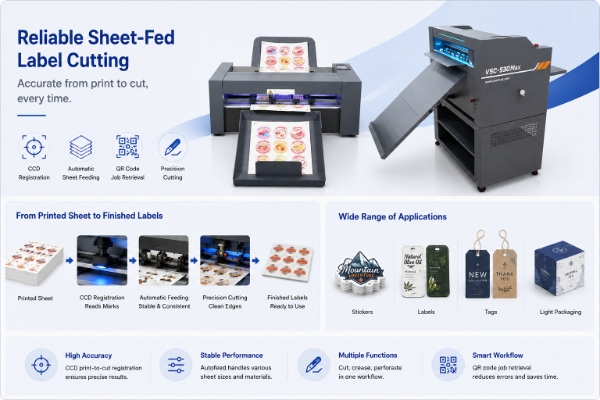
How to Choose a Sheet Label Cutter: Seven Factors to Compare
Operation count: kiss cut only, or cut plus crease/perforation?
Job mix: repeated labels or frequent switches between labels, tags and samples?
Registration: can the camera read marks on the actual print and maintain print-to-cut registration?
Feeding: does the stack feed consistently with curl, coating and static?
Tool workflow: which tools are installed, assigned, changed and calibrated, and what is the real tool changeover time?
Finished-piece handling: will through-cut pieces or waste interfere with output?
Support boundary: which operator adjustments are documented, and which require technical support?
Add two commercial checks. Compare the real time and error risk of manual tool changes with the cost of the dual-tool configuration. Then identify whether future work is supported by current customer demand or is only hypothetical. Unused complexity can add training and maintenance without improving present jobs.
Build a Job-to-Tool Matrix
Create one row per representative product and record material compatibility, sheet imposition, printed sheet size, finished shape, kiss-cut path, full-cut path, crease or perforation, registration method, batch size, changeover frequency and required tool. Mark the result as verified, conditional or outside scope.
The matrix prevents conclusions such as “dual head is always better for packaging.” A sticker sheet may need one cutting tool even at substantial volume. A small run of folded tags may benefit from two installed tools because every sheet needs both cutting and creasing. Configuration follows operation mix, not product label alone.
Automatic Sheet Label Cutter Demo Test Checklist
Provide mixed printed sheets, representative QR/registration workflows, smallest label shapes, long contours, kiss-cut and full-cut paths, crease samples and difficult stocks. An automatic sheet cutter with CCD camera registration should be tested on the actual printed marks, coatings and sheet conditions used in production. Run multiple consecutive jobs. Inspect registration, liner damage, corners, crease quality, feeding, output order and recovery from a failed sheet.
Time the entire test from file selection to approved output. Record tool installation, calibration or baseline test, loading, mark reading, cutting, output handling and changeover. Repeat a previous job to show whether saved settings and job retrieval are dependable. Ask the supplier to document every included tool and accessory.
Sheet Label Cutter Configuration Risks That a Speed Test Can Miss
A short demonstration on one easy material may hide daily constraints. Test sheets stored under normal shop conditions, not only freshly prepared samples. Observe static, curl, coating, separation in the feeder and whether cut pieces interfere with the next sheet. Repeat after a tool change and after switching between files.
Confirm how cutting, kiss-cutting, crease and perforation paths are identified, how plugins export them and how the operator verifies the job. A second installed tool is useful only if prepress sends the correct paths and production can recover a saved setup reliably.
Record errors, not only minutes: misfeeds, unread marks, incorrect job retrieval, tool-selection mistakes, liner damage, incomplete cuts and rejected creases. A fast sample requiring frequent intervention may not outperform a simpler verified workflow. Reducing a repeated, error-prone tool change can nevertheless create real value.
Single-Head vs Dual-Head Sheet Label Cutter Final Selection Checklist
The quotation states carriage, tool positions and included tool types.
Every frequent job is mapped to a tool and verified material.
Kiss cut, full cut, crease and perforation are tested where required.
Mixed-job retrieval and registration are tested on production prints.
Feeding and output remain stable through consecutive sheets.
Changeover, consumables and operator maintenance are documented.
Unsupported packaging materials are assigned to another workflow.
The best sheet cutter for labels and light packaging is not automatically the model with the longest feature list. It is the configuration that completes the verified operation mix with controlled handoffs and supportable settings.
Use this single-head vs dual-head sheet label cutter comparison to choose a configuration from the required operations and proven sample result. Do not pay for dual tools only because the label sounds more advanced, and do not choose one tool if frequent cut-and-crease work creates avoidable manual intervention. Review the Vicut sheet cutter range before finalizing the quoted configuration.
 vicutcnc@cncvicut.com