Key Takeaways
An autofeed sheet label cutter may support formats from Letter and A4 through A3+, while larger configurations can extend to B-series sheets.
Supported media size, effective cutting area and usable print-and-cut area are different measurements.
GSM is only a screening value; thickness, stiffness, coating, liner, curl and static also affect compatibility.
Sticker paper, photo paper, cardstock and selected synthetic films require different blade, feeding and registration settings.
The most reliable purchasing test uses the buyer’s actual printed file and production material.
An autofeed sheet label cutter takes printed sheets from a stack and feeds them to the cutting section. In a typical print-and-cut workflow, a vision system then reads registration marks and aligns the digital cut path with the printed artwork. There is no universal limit for sheet size, paper weight or material. The practical answer depends on the feeder, cutting area, tool configuration and complete construction of the substrate—not only the largest size or highest GSM in a specification table.
What Sheet Sizes Can a Sheet Label Cutter Handle?
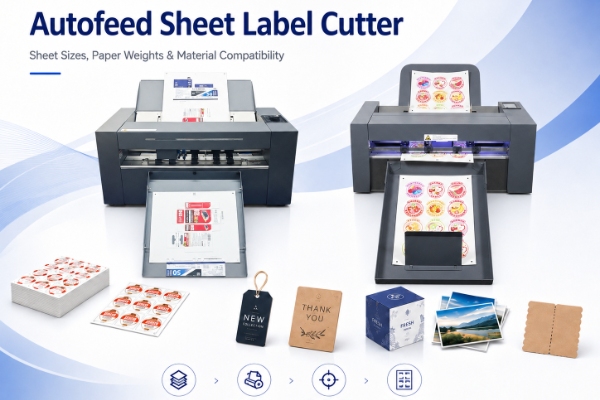
The supported sheet label cutter paper size varies by machine class. Compact systems commonly focus on Letter, A4, A3, SRA3 and A3+ work. Larger production systems may support B3 or B2 sheets for bigger label layouts, tags, cards and light-packaging samples.
Buyers should separate three size specifications:
| Specification | Meaning |
|---|
| Supported media size | Physical sheet dimensions and orientation accepted by the feeder |
| Effective cutting area | Maximum region the cutting tool can reach |
| Usable print-and-cut area | Space remaining after printer margins, registration marks and waste borders |
A sheet may enter the feeder but still leave insufficient room for the complete cut path. Standard format names can also hide small dimensional differences. For an A3 sheet label cutter, confirm whether the workflow uses A3, SRA3 or A3+, then provide the exact width and length in millimetres.
An automatic sheet label cutter media size should therefore be checked with the imposed production file. Include its loading orientation, registration marks, barcode or QR code and the intended waste margin.
What Paper Weights Can It Process?
Published media limits are commonly stated either as sheet label cutter paper weight in GSM or as material thickness in microns, millimetres or points. Basis weight and thickness are different measurements and should not be treated as interchangeable. Some machines are optimized for thin self-adhesive label constructions; others can cut and crease heavier paper cards.
Two 300 gsm sheets can have different thickness and bending stiffness. A laminated card may be thicker and less flexible than uncoated stock of the same basis weight. Self-adhesive media combine face stock, adhesive and release liner, so the complete construction must be considered.
Feeding capacity also changes with the material. A tray holds fewer thick sheets than thin sheets, and curl or static may require a smaller stack. Test the actual production stock rather than converting a capacity stated for lightweight paper into a universal sheet count.
What Materials Can a Sheet Label Cutter Cut?
The answer to what materials can a sheet label cutter cut depends on both the substrate and the required operation.
Sticker and Label Paper
A sheet label cutter for sticker paper normally performs kiss cutting: the blade cuts through the face stock and adhesive layer while leaving the release liner substantially intact. Blade depth, liner consistency and optical registration must be tested together. Inspect the removable label and the liner because a clean face can still hide excessive liner damage.
Photo and Glossy Paper
A sheet label cutter for photo paper must avoid coating scratches and roller marks. Heavy ink coverage can change curl and surface friction, while static can affect sheet separation and collection. Use printed samples rather than blank paper during the demonstration.
Cardstock and Light Packaging
A sheet label cutter for cardstock may full-cut cards, tags, invitations and paper crafts. A sheet label cutter for light packaging may also cut and crease short-run cartons or sleeves. Confirm the available tools, cutting force, effective area and fold quality. Digitally printed or coated card should be folded after creasing to check for surface cracking.
Synthetic and Specialty Media
Selected transparent films, synthetic sheets, transfer paper and laminated materials may be compatible, but these names cover many different constructions. Flexibility, backing, surface friction and static affect feeding; transparency, reflectivity and print contrast affect optical registration. Surface energy is more relevant to ink, coating and adhesive performance. Each production material requires its own test.
For a roll-label perspective, see what changes when cutting paper facestocks versus film constructions.
Why GSM Alone Does Not Prove Compatibility
GSM measures mass per square metre, not thickness or mechanical behavior. This is why industry specifications use different units: some manufacturers publish GSM, others publish thickness in microns, and some provide both.
Before approving material compatibility, check:
thickness, stiffness and grain direction;
coating, lamination and surface friction;
adhesive and release-liner construction;
paper curl, static and ambient humidity;
toner or ink coverage;
registration-mark contrast;
skew and double-feeding risk.
Automatic feeding makes these variables especially important. A manual operator can correct a difficult sheet, but an automatic feeder must separate, align and transport a stack repeatedly. Run several sheets and compare the beginning, middle and end of the batch rather than approving the material after one successful cut.
Match the Cutting Operation to the Material
The same sheet may require different tools and settings depending on the finished product:
Kiss cutting cuts the face material but retains the liner.
Full cutting cuts through the face stock and liner or backing; small loose parts may require retention tabs or another collection method.
Creasing creates fold lines in cards and light packaging.
Perforation creates a controlled tear line.
Contour cutting follows printed shapes using registration marks.
A single-tool configuration may be sufficient for repeated sheet labels. A dual-tool setup becomes more relevant when jobs combine cutting and creasing. It does not automatically double production speed because scanning, feeding, cut-path length and tool movement still affect total job time.
Material Sample Test Checklist
Provide the supplier with:
exact sheet width, length and loading orientation;
GSM and measured thickness, if available;
coating, adhesive, liner and lamination details;
printed file and registration-mark workflow;
kiss-cut, full-cut, crease or perforation requirement;
planned batch size and acceptable operator intervention.
Inspect feeding, skew, double feeding, registration, liner damage, coating marks, corners and finished-sheet collection. For creased work, fold the sample and inspect the printed surface. Keep the approved file, input sheet and output sample with the quotation.
Choose by Application, Then Verify by Sample
Select a sheet label cutter from the real workflow: sheet dimensions, usable cutting area, material construction, feeding behavior and required operation. Published specifications can create a shortlist, but printed production samples provide the strongest evidence that an autofeed sheet label cutter can run the job consistently.
Where Vicut’s Autofeed Sheet Cutters Fit
Vicut’s autofeeding sheet label cutter range includes compact configurations for contour-cut labels and larger configurations for labels, cards, tags and selected light-packaging work. Because media limits and tool options vary, buyers should verify the relevant product page and quoted configuration instead of applying one specification to the entire range.
FAQ
Q1:What is an automatic roll to sheet cutter?
An automatic roll-to-sheet cutter, also called a sheeter or cut-to-length system, unwinds a continuous web and cross-cuts it into sheets of a preset length. Some systems can also slit the web or cut from printed registration marks.
Q2:What is the typical size of a paper cutter?
“Paper cutter” may refer to a desktop trimmer, guillotine, sheeter or digital contour cutter, so there is no universal size. Compare machines within the same category by input width, cutting area and installation footprint.
Q3:Does an autofeed sheet label cutter require a cutting die?
No physical cutting die is normally required. The machine follows a digital vector cut path, although it still uses model-specific blades, tools and replaceable cutting surfaces.
Q4:Can different print-and-cut jobs be loaded in the same stack?
Only when the machine and software support per-sheet job recognition. A barcode or QR-code workflow can identify each sheet and retrieve the matching cut file; otherwise, each stack should contain one validated job.
Q5:What files are needed for automatic print-and-cut work?
The workflow normally requires printed artwork and a matching vector cut path. Registration marks and any job-retrieval code must be generated in the format required by the cutter’s software.
 vicutcnc@cncvicut.com