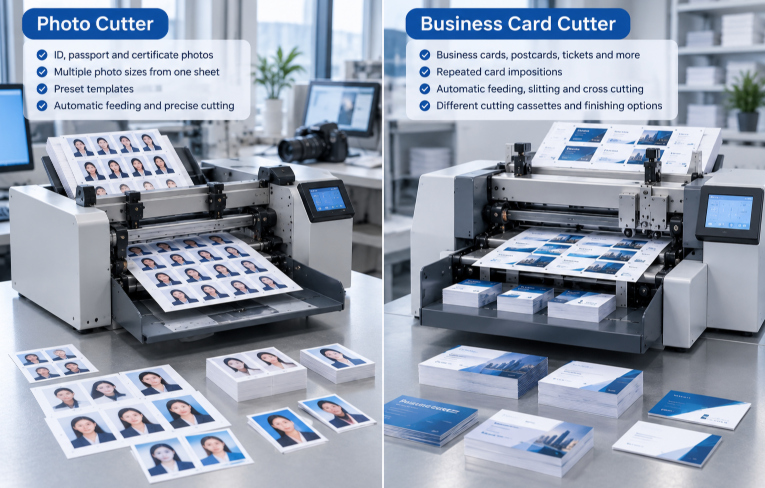
The photo cutter vs business card cutter decision can be confusing because both machines accept printed sheets and deliver small rectangular products. They are nevertheless optimized around different jobs. A photo cutter machine prioritizes ID and passport formats and photo-paper workflows. A business card cutter prioritizes repeated card impositions, predictable finished sizes and efficient separation of cards and waste.
For model context, compare the PC-220 photo cutter with the VICUT card cutter range before testing.
Quick Comparison
| Decision point | Photo cutter | Business card cutter |
|---|
| Primary output | ID, passport and small-format photos | Business cards, postcards, tickets and similar cards |
| Typical layout logic | Multiple photo sizes from a printed sheet | Repeated card rows and columns |
| Key validation | Photo sizes, photo paper and template | Finished width, imposition, cassette and stock |
| Best buyer | Photo studio or document-photo service | Print shop with recurring card orders |
| Special jobs | Verify each format and material | Verify creasing, perforating or custom cassette by model |
The correct choice follows the dominant finished product, not the generic word card.
Start with the Finished Product, Not the Machine Name
Write down what customers actually collect at the counter. A passport-photo order may require several small images from one sheet, a specific local format and clean photo-paper edges. A business-card order normally requires many repeated cards, controlled margins and efficient sorting. Postcards and tickets introduce other finished dimensions, while shaped cards move beyond ordinary rectangular slitting.
This output list prevents two common purchasing errors. The first is choosing a card cutter machine because an ID photo is loosely described as a “photo card.” The second is assuming that a machine for cutting ID photos will support every imposed business-card width, stock and finishing operation. Product labels overlap; production logic is the better guide.
What a Photo Cutter Is Designed to Produce
Vicut positions the PC-220 for mini photos including ID, passport and certificate photos. Its official page describes automatic stack or set-number feeding, preset templates and the ability to cut different photo sizes from one printed sheet. That production logic suits shops that repeatedly convert printed photo sheets into standardized photo sets.
For a demonstration, bring real photo layouts rather than a generic business-card PDF. Confirm that the required local ID-photo formats exist or can be supported, and test the actual photo paper, surface finish and printer output. Gloss, curl and static can affect feeding even when nominal paper dimensions appear suitable.
What to verify in a passport photo cutter machine
Create a list of all document-photo sizes sold in the target market and note how many copies customers normally request. Check whether preset templates match those formats and whether different photo sizes can be arranged in the required production workflow. Verify how the machine detects position, how sheets are loaded and how finished photos are collected without mixing orders.
Vicut’s PC-220 official page describes the product as an ID photo cutter for mini photos, including passport and certificate photos. It also describes preset templates, automatic stack or set-number feeding, and supported photo-paper formats. These are model-specific statements; any paper range, size or production figure used in sales material should be checked against the current model page and actual quotation.
What a Business Card Cutter Is Designed to Produce
The CC-220, CC-330 and CC-330S family is built around automatic feeding, longitudinal slitting and lateral cross cutting. Preset layouts and interchangeable cutting cassettes support repeated card production. The official CC-330S page also lists registration control and optional creasing or perforating, but these capabilities must be verified for the exact model and accessory configuration being quoted.
Review the CC-330S business card cutter page for model-specific functions before finalizing the job matrix.
A business card cutter is strongest when jobs share repeatable finished widths and imposed layouts. It can reduce the repeated measuring and multi-step handling of manual trimming. It does not, however, make every shape or size possible. Irregular contour work belongs in a different digital-cutting workflow, while die-cut card work should be evaluated separately.
What to verify in a business card cutter for print shops
List common finished widths, sheet sizes, rows and columns, gutter logic, paper weights and whether the shop regularly needs creasing or perforating. Then map those jobs to the quoted cutting cassette and preset layouts. Ask the supplier to identify which capabilities are standard, optional or dependent on a customized cassette.
Registration control can help supported configurations respond to certain print-placement shifts, but it cannot fix an incorrect imposition or missing bleed. The full production test must therefore begin with the shop’s own printed sheets, not a supplier-prepared sample alone.
Key Differences in Workflow
Finished-product standard
Photo services often organize orders by national document-photo size, number of copies and photo-paper format. Business-card production is organized by finished card size, sheet imposition, gutter, stock and finishing requirements.
Layout and changeover
A photo cutter benefits from readily selectable photo templates. A card cutter relies on the relationship between the printed imposition and installed cassette or cutting layout. Count the real changeovers in a working day: switching a file may be easy, while changing a cassette, stock or downstream process can require more preparation.
Material validation
Do not buy from a paper-name assumption alone. Test sheets printed on the production printer. Check coating, grain, thickness, curl, static, toner cracking near folds and whether the stack feeds consistently. Published limits describe a rated configuration, not every combination of media and print process.
Product range
A shop that mainly sells document photos benefits from a dedicated photo workflow. A shop producing business cards, postcards and tickets benefits from a card workflow. If the order mix includes contour stickers, shaped tags or short-run packaging, an autofeeding sheet cutter or flatbed cutter may be more appropriate than forcing those jobs through a rectangular card cutter.
Finished-edge expectations
Photo buyers look closely at faces, backgrounds and clean edges. Business-card buyers also judge edge quality, but full-bleed backgrounds, thin frames and duplex alignment create different inspection points. In both workflows, retain an approved sample and compare the first, middle and last output from a batch.
Order separation and counting
A machine can cut accurately and still create downstream labor if several customers’ outputs are mixed. Observe how sheets are loaded, whether set-number feeding supports the photo workflow, how cards or photos arrive in the tray and how waste is separated. Include recounting and packaging in the selection decision.
One Machine or Two Dedicated Workflows?
Some shops can cover the majority of work with one configuration, particularly when outputs use a limited set of rectangular formats. But a claim that a machine “cuts photos and cards” does not prove that it handles the shop’s dominant photo paper, every required ID size, all business-card widths and the desired changeover pattern equally well.
Build a job matrix with columns for monthly frequency, batch size, input sheet, stock, finished size, layout, registration need and optional operation. Mark each job as verified, requires accessory, requires another machine or not tested. A second dedicated machine may be justified when two workflows are both frequent and their setup requirements conflict. No universal volume threshold or return-on-investment period should be assumed.
Three Print-Shop Scenarios
Photo studio with frequent passport and certificate orders: start with a photo cutter and test every required local size. Speed matters, but correct format selection and reliable photo-paper feeding matter more.
Commercial printer with recurring imposed card sheets: start with a business card cutter. Evaluate the common finished widths, sheet sizes, registration method, waste handling and repeat-order setup.
Mixed shop producing photos, cards and shaped promotional work: list revenue and order frequency by output. One machine may cover the dominant rectangular work while a separate sheet or flatbed cutter handles irregular contours and specialty materials.
What to Bring to a Machine Demo
Bring production PDFs and printed stock to a VICUT card cutter demo so the comparison uses real layouts and materials.
Prepare:
the most common photo and card layouts;
actual photo paper and card stock;
finished dimensions and acceptable tolerance;
required registration, creasing or perforation operations;
expected batch size and changeover sequence;
packaging, counting and waste-handling requirements.
Ask the supplier to record the exact model, cassette, software setting, feed method and any option used in the test. Keep the input sheets, first output, middle output and final output with the quotation.
Questions to Ask the Supplier
Which photo sizes and card layouts are supported by the quoted configuration?
Which paper weights, coatings and sheet formats have been tested?
Is a custom cassette or accessory required for the target finished size?
How are registration or print-placement variations detected?
Can the workflow separate jobs and count sets without mixing output?
Which functions are standard, optional or model-specific?
What happens after a jam, missed mark or incorrect sheet?
What evidence will be provided with the sample test?
Frequently Asked Questions
Can a business card cutter cut passport photos?
It may cut rectangular photos if the layout, paper and cassette are supported, but buyers should not infer support for every passport-photo format. Test the actual photo layout and paper.
Can a photo cutter make business cards?
A photo cutter may handle some rectangular work, but it should not be assumed to support every business-card width, stock, cassette or finishing operation. Test the dominant card jobs.
Is a photo cutter the same as a PVC card cutter?
No. A photo cutter generally handles printed photo sheets, while PVC card production can involve different materials, thicknesses and cutting requirements. Confirm the material and tool path for the exact machine.
What if the shop also produces shaped cards or stickers?
Add the shaped work to the job matrix and evaluate an autofeeding sheet cutter or flatbed cutter if the contour, material or tool requirement falls outside rectangular card cutting.
Final Job-Matrix Check
Before choosing a photo or card cutting machine, total verified jobs rather than theoretical applications. The selected configuration should process the largest share of current work with acceptable setup, feeding, edge quality and collection. Note every job that needs another cassette, optional tool or separate machine. Keep the test file, printed input and finished samples with the quotation so the delivered configuration can be checked against the same evidence.
Final Selection Checklist
Dominant finished product identified.
Required layouts and sizes listed.
Production paper and coatings tested.
Feeding, registration and collection observed.
Changeover and recovery documented.
Output counted, inspected and separated.
Exact model and accessories recorded.
Unsupported jobs assigned to another workflow.
 vicutcnc@cncvicut.com