Key Takeaways
The best business card cutter machine is not simply the fastest or most expensive model. It should match your printed sheet size, card stock, daily production volume, required card dimensions, finishing style, and level of automation.
Print shops producing standard rectangular cards usually benefit most from an automatic business card cutter with slitting and cross-cutting functions. Businesses producing rounded corners, thick specialty stocks, promotional cards, or custom shapes may instead need a die-cut business card machine.
Before purchasing a business card cutting machine, compare cutting accuracy, registration correction, feeding capacity, supported paper weight, changeover time, blade or die life, maintenance requirements, and technical support.
A business card cutter machine may look like a relatively simple piece of post-press equipment, but choosing the wrong model can create problems throughout the digital printing and finishing workflow.For commercial printers, copy centers, digital print shops, and short-run printing businesses, choosing the right business card cutter for a print shop therefore starts with the job—not the machine.
1. Start With the Business Cards You Actually Produce
Before comparing motor power, cutting speed, or machine price, review your current order mix.
Choosing the best business card cutter machine becomes much easier when you first understand the products and materials your shop processes every day.
Ask four questions:
What sheet sizes come from your printer?
What paper weights do you process most frequently?
Are most cards standard rectangles or specialty shapes?
How many cards do you need to finish during peak production?
These questions quickly separate occasional card cutting requirements from commercial, high-volume production.
A small print shop processing short-run business cards may prioritize simple operation and low labor requirements. A busy digital print center may instead require an automatic card cutting machine with stable sheet feeding and fast batch processing.
Premium card producers often need greater flexibility for thick paper, laminated card stock, rounded corners, and specialty shapes.
Typical Buyer Requirements
| User | Main Priority | Suitable Cutter Type |
|---|
| Small print shop | Easy operation, low labor | Automatic business card cutter |
| Digital print center | Fast batch processing | Auto-feed slitter/cross cutter |
| Commercial printer | Stable repeated production | High-capacity card cutting machine |
| Premium card producer | Thick stock, special shapes | Die-cut card cutter |
| Design/creative studio | Flexible sizes and short runs | Programmable card cutter machine |
| Equipment distributor | Wide application coverage | Multiple card cutter configurations |
For most buyers, the right machine is the one that matches the orders that actually generate revenue.
2. Match the Business Card Cutter to Your Printer's Sheet Size
One of the most common purchasing mistakes is checking finished card size while ignoring the machine's input sheet size.
If your digital printing workflow is based on A3, A3+, or SRA3 output, buying an A4-only business card cutter machine creates an unnecessary trimming step before the sheets can enter the cutter.
This affects more than convenience.
Additional pre-trimming can:
increase operator workload
slow down short-run production
increase handling errors
create alignment problems
reduce overall post-press efficiency
A professional business card cutting machine for digital printing should therefore fit naturally into the output format of the printing equipment already used in your shop.Reducing intermediate trimming means fewer operator steps and less opportunity for alignment errors.
3. Check Paper Thickness—Not Just Card Size
Business cards vary considerably in material, and paper thickness is one of the most important specifications when choosing a professional business card cutter.
Standard coated card stock may be relatively straightforward to process, but today's print shops increasingly offer:
heavy card stock
laminated cards
textured paper
specialty paper
promotional cards
PVC cards
luxury thick cards
A machine's maximum paper weight should therefore be checked against the actual materials you intend to sell rather than a generic business card specification.
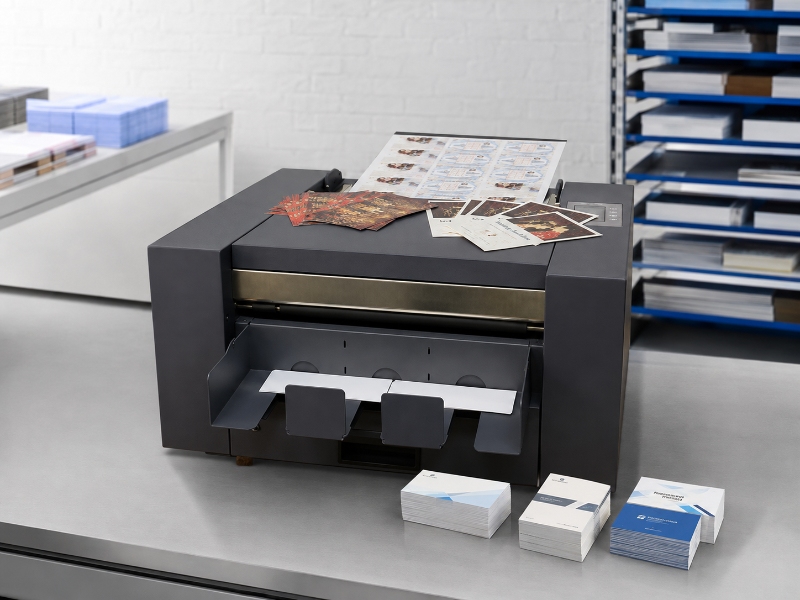
4. Cutting Accuracy Matters More Than Headline Speed
Manufacturers frequently promote cards per minute, but maximum production speed means little if operators must repeatedly correct misaligned cuts.
For a commercial business card cutter machine, repeatable cutting accuracy is usually more important than a small difference in rated speed.Digital printing can introduce small positional shifts between sheets. Feeding can introduce another source of variation.A professional business card cutter should therefore be evaluated on four areas.
Registration Control
Can the automatic business card cutter detect printed registration marks or compensate for changes in sheet position?
Registration correction is particularly useful for digitally printed sheets where image position may vary slightly from one sheet to another.
Cutting Tolerance
What repeatable cutting tolerance does the manufacturer specify?
A machine may achieve good results on one test sheet, but commercial production requires consistent accuracy across hundreds or thousands of cards.
Feeding Stability
Can sheets move consistently through the card cutting machine without skewing?
Stable feeding is important for maintaining consistent margins, card dimensions, and cutting quality during longer production runs.
Waste Rate
How many printed sheets are typically lost during setup and adjustment?
Reducing setup waste is especially important for short-run printing, premium paper, and customized business card orders.
5. Decide Between Automatic Slitting and Die Cutting
One of the most important decisions when choosing a business card cutter machine is whether you need automatic slitting and cross cutting or a die-cutting system.
Automatic Slitting and Cross Cutting
A conventional automatic business card cutter feeds printed sheets through fixed or interchangeable slitting blades and then performs horizontal cross cuts.For a print shop producing mainly standard rectangular cards, an automatic business card slitter and cutter can deliver fast job setup, high repeatability, and lower operator involvement.
Die Cutting
A die-cut business card machine uses a shaped cutting tool or metal die to cut the finished card.Vicut's CC-580, for example, uses customized metal dies and is designed for shapes beyond conventional rectangles, including rounded cards and specialty promotional products.
| Requirement | Automatic Slitter | Die Cutter |
|---|
| Standard rectangular cards | Excellent | Good |
| High-volume repeat jobs | Excellent | Excellent |
| Fast job change | Excellent | Depends on die |
| Custom shapes | Limited | Excellent |
| Rounded corners | Limited/optional | Excellent |
| Very thick stock | Model-dependent | Better suited |
| Tooling required | Usually no custom die | Yes |
| Personalized short runs | Excellent for standard sizes | Better for specialty shapes |
Neither technology is universally better.The best choice depends on your customer orders, material range, production volume, and finishing requirements.
6. Think Beyond Standard Business Card Sizes
Different countries, print shops, brands, and customers may use slightly different card dimensions.This means a programmable business card cutter machine can be more useful than a cutter restricted to one fixed finished size.
If your business serves international clients or produces multiple card products, check whether the machine allows:
adjustable horizontal cutting length
interchangeable slitting cassettes
programmable cutting sizes
custom cutter configurations
multiple sheet layouts
7. Evaluate the Total Print Finishing Workflow, Not Just the Cutter
The business card cutter machine sits in the middle of a larger post-press production process:Print → optional lamination/foiling → cutting → sorting → packing
A machine that performs well by itself can still create bottlenecks if it does not integrate efficiently with upstream and downstream equipment.
Before purchasing, check:
8. What Should You Ask a Business Card Cutter Supplier Before Buying?
A serious equipment evaluation should include more than receiving a quotation.
When comparing a business card cutter machine supplier, ask the manufacturer to demonstrate your own material whenever possible.
Business Card Cutter Buying Checklist
Before placing an order, confirm:
What paper sizes can the machine accept?
What is the recommended paper-weight range?
What is the repeatable cutting tolerance?
How does registration correction work?
What is the realistic production speed for my layout?
Can cutting sizes be customized?
How long do blades, cassettes, or dies typically last?
How quickly can consumables and spare parts be supplied?
Is remote troubleshooting available?
What warranty and technical documentation are included?
For machinery entering the European market, buyers should also verify applicable conformity documentation and safety requirements.
Conclusion
Choosing the best business card cutter machine should begin with your production workflow rather than a simple machine price comparison.Identify the sheets coming from your digital printer, the card stocks your customers buy, the finished formats you need to produce, and the number of jobs your operators handle each day.If you are unsure which business card cutting machine fits your workflow, sending several representative printed files, paper specifications, card sizes, and expected daily volumes to the equipment supplier is usually the fastest way to narrow the choice.
 vicutcnc@cncvicut.com