Key Takeaways
Automatic nesting reduces cutting waste by arranging parts more efficiently within the usable roll width and cutting length.
The biggest gains come from controlling gaps, edge margins, orientation, repeat jobs and leftover material—not from a software button alone.
A good nesting workflow must respect grain, print registration, safe spacing, cut order, tool limits and the finished-product requirements.
Measure material yield and accepted output separately from cutting speed; a faster job can still waste more material.
Ask for a real-file test that compares the same artwork and roll construction with manual and automatic layouts.
Automatic nesting is the software process of arranging multiple cut shapes inside the usable area of a roll so that less material is left between parts, at the edges or at the end of a job. In roll-fed digital cutting, better nesting can reduce scrap, shorten the material path and make more pieces fit into a repeat. It does not guarantee a fixed percentage of savings: the result depends on shape geometry, roll width, safe gaps, registration margins, material direction and the operator’s rules.
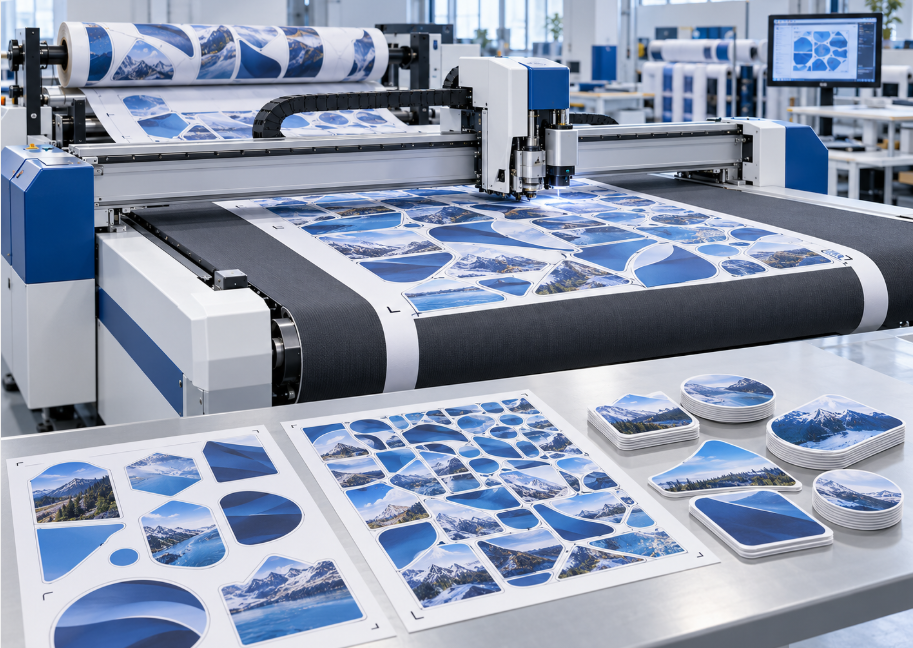
1. What Nesting Changes in a Roll-Fed Workflow
Without nesting, an operator may place shapes one by one, leave large gaps for convenience or use a layout designed for a different width. Automatic nesting evaluates the available cutting area and places the parts according to rules such as:
usable roll width and edge margins;
minimum gap between contours;
allowed rotation or fixed orientation;
repeated quantities and mixed part sizes;
print, registration or bleed boundaries;
material grain, stretch direction or surface pattern;
cut order and waste-removal requirements.
The result is a cut plan rather than a promise. The plan still needs to be checked against the actual material path and the finished product. The VICUT VFR1312 roll flatbed cutting machine page describes conveyor feeding, CCD-assisted contour work and nesting as part of a model-specific workflow. Buyers should confirm the same functions on the quoted model and software version.
2. Where the Material Savings Come From
Better use of the roll width
If the parts are narrower than the roll, poor placement can leave a continuous unused strip. Nesting can rotate or stagger compatible shapes so that more of the usable width is occupied. Rotation should not be allowed when the material has grain, a directional print or a required installation orientation.
Smaller gaps between compatible parts
Every job needs a safe distance for cutting, registration and waste removal. Excessive gaps consume material; gaps that are too small can cause edge damage, parts to merge, or waste to become difficult to weed. The correct target is the smallest gap that remains reliable on the specific material and tool.
More efficient repeats
Repeated labels, decals or film patterns can be arranged as a controlled repeat instead of being placed manually. This reduces layout variation and makes the job easier to inspect. It does not remove the need to allow for registration drift or a safe end margin on a long roll.
Better use of remnants
Some nesting workflows can place a new job into a suitable leftover section rather than opening a new roll. This requires the operator to record the remnant width, length, material construction, print status and orientation. A remnant that is physically large may still be unusable if its surface, liner or registration condition does not match the new job.
Mixed orders in one cut plan
Where the software and production rules allow it, compatible parts from several orders may be grouped into one layout. This can improve utilization, but only if sorting, job identification, registration and packing remain controlled. Mixing orders is not automatically efficient if it increases errors or manual separation.
3. Automatic Nesting Is Not the Same as Maximum Yield
A layout can look tightly packed and still perform badly in production. Before approving it, check five boundaries:
| Boundary | Why it affects the result |
|---|
| Registration margin | Printed contours need space for mark reading and print-to-cut variation |
| Material direction | Film, fabric, reflective media and graphics may have a required orientation |
| Tool clearance | Blades and tool paths need safe separation to avoid edge interference |
| Waste removal | Small gaps or islands may make weeding slower or cause waste breaks |
| Finished handling | Parts must stay identifiable and packable after cutting |
The roll feeding flatbed cutter buying guide recommends comparing material, cut type, registration, feeding and real production tests together. Apply the same principle to nesting. A theoretical high-utilization layout is not a production improvement if the operator must stop repeatedly to remove tangled waste or sort mixed orders.
4. How to Measure Nesting Performance
Use the same artwork, material roll and job quantity for a manual-layout test and an automatic-nesting test. Record:
usable roll width and length consumed;
total material area loaded or reserved;
part count released as accepted output;
edge waste, inter-part waste and end-of-job waste;
setup, nesting review, cutting and sorting time;
rejected parts, misregistration and waste-removal problems;
remaining remnant size and whether it is reusable.
A simple material-yield calculation is:
Material yield = accepted part area ÷ usable material area consumed
Use the same boundaries in both tests. Do not compare the automatic layout against a manual layout that uses different margins or a different quantity. Also record accepted output separately. A layout with high geometric utilization can still deliver lower usable yield if it creates more rejected pieces.
The real digital label finishing throughput guide explains why usable production should include setup, registration, handling and accepted output rather than headline machine movement. The same measurement discipline prevents nesting software from being judged only by a visual layout percentage.
5. What Buyers Should Ask the Supplier
Before buying a roll-fed digital cutter, ask for a nesting demonstration using your files:
Can the software set minimum gaps and edge margins?
Can parts be rotated, or must they preserve orientation?
Can the layout follow print registration marks or segmented cutting zones?
Can the operator save and reuse a verified layout?
Can leftover material be defined and reused safely?
Can different jobs be identified during cutting and collection?
Does nesting work with the quoted cutter, software version and material path?
Which layout steps remain manual?
Send a simple shape, an irregular contour, a long pattern and a difficult material. Include one job where orientation is fixed and one where rotation is allowed. Ask the supplier to return the layout, the material assumptions and the actual consumed length. Do not approve a material-saving claim from a stock demonstration alone.
6. When Tighter Nesting Can Create New Problems
The most compact layout is not always the best production layout. Parts that are too close together can make weeding difficult, damage narrow features or cause a waste strip to tear across a finished piece. A mixed layout may save material but increase sorting time. Rotated graphics may fit better but fail a directional appearance requirement. Small remnants may look economical but be unusable for the next job.
For flexible films, also watch curl, static, surface tension and feed drift. Nesting changes where the tool travels; it does not correct an unstable material path. The machine still needs reliable feeding, hold-down, registration and depth control. When the material or job is difficult, approve the layout only after the complete cut-and-collect workflow has been tested.
Is Automatic Nesting Worth It for Every Roll-Fed Job?
It is most valuable when the shop cuts multiple parts, changes job sizes frequently, buys expensive media or regularly leaves usable remnants. A simple single-shape job with a fixed repeat may gain less from complex nesting than a mixed job with many contours. The right question is not “does the software have nesting?” but “does the tested layout improve accepted yield after setup, cutting, weeding and sorting?”
VICUT’s roll feeding flatbed cutter range is intended for flexible roll media and model-specific cutting workflows. Ask the supplier to match nesting, registration, feed control and tool requirements to the material you actually sell. If the primary work is automotive film or long roll-fed graphics, also compare the roll feeding cutting plotter range because media path and output handling may differ.
Frequently Asked Questions
Does automatic nesting eliminate waste?
No. It can reduce layout waste, but edge margins, safe gaps, registration, orientation, tool clearance and handling still create unavoidable waste. It may also introduce sorting or weeding work if the layout is too dense.
Can nesting reduce material cost?
It may reduce material consumed per accepted part, but the financial effect depends on material price, rejected output, labor, setup and whether remnants are reusable. Calculate from real jobs rather than a generic percentage.
Does nesting make the cutter faster?
Not necessarily. A compact layout may reduce travel or material length, but complex contours and more parts can increase cutting time. Measure accepted output and material yield separately.
What files should I use for a nesting test?
Use representative production files: a simple shape, irregular contours, different part sizes, fixed-orientation artwork and the most difficult material. Include the required bleed, registration marks and finished output rules.
Request a Real-File Nesting Demonstration
Send VICUT the roll width, material construction, artwork files, required spacing, orientation rules and expected output. Ask for a manual-versus-automatic layout comparison that records material consumed, accepted pieces, waste handling and reusable remnants. Contact VICUT before turning an automatic-nesting feature into a purchasing assumption.
 vicutcnc@cncvicut.com