Key Takeaways
A digital roll label cutter feeds a printed web, reads registration information, follows a digital contour with a blade, removes the matrix and delivers slit or rewound labels.
The cutting path is stored in software, so a new label shape does not require a shape-specific rotary die. That does not eliminate setup: material, liner, registration, cut depth and output still need to be validated.
A complete digital label finishing line is more than the cutting head. Web guiding, tension control, lamination, matrix removal, slitting and rewinding determine whether the finished roll can be used.
The useful production test is the complete path from the buyer’s printed roll to the approved output—not the cutter’s headline movement speed.
Digital roll label cutting is a roll-fed finishing process in which a computer-controlled blade follows a digital cut file instead of pressing a physical die into every repeat. The printed or blank web is unwound, aligned to registration marks, cut to the required depth, stripped of waste and converted into finished rolls or another specified output. For a product-specific example, see the VICUT VR30X Pro digital roll label cutter, but confirm every function against the quoted configuration.
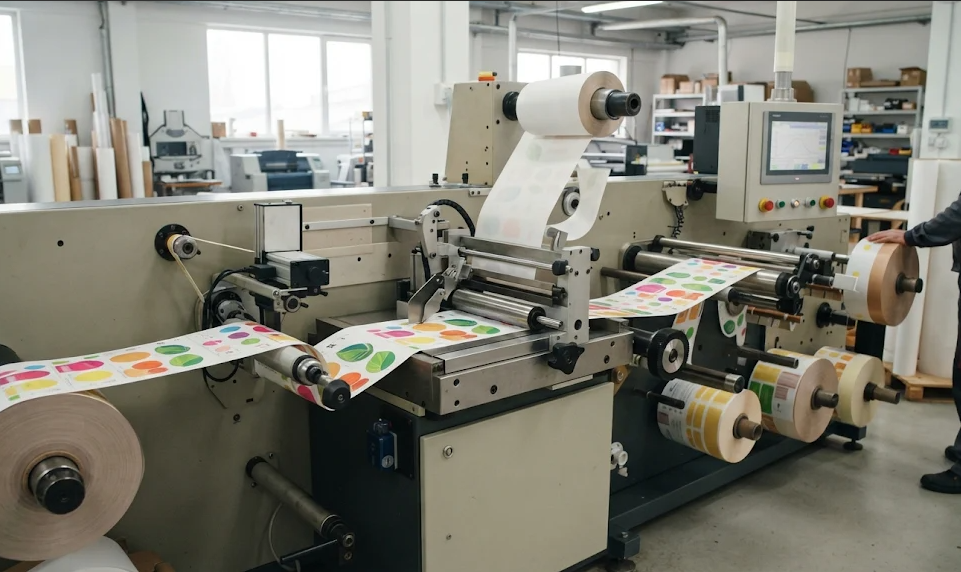
What Happens Inside a Digital Roll Label Cutter?
The process has six connected control points:
| Stage | What the machine must control | What the operator should verify |
|---|
| 1. Unwind | Roll alignment, web path and tension | Roll width, core, direction and material construction |
| 2. Register | Mark or code detection and web position | Mark contrast, artwork-to-cut offset and repeat stability |
| 3. Cut | Blade angle, pressure, offset and path motion | Kiss cut, full cut or contour result on the real liner |
| 4. Strip | Waste-matrix path and separation tension | Clean waste removal without lifting labels |
| 5. Slit | Knife position and edge guiding | Required lanes, slit width and edge quality |
| 6. Rewind or sheet | Core alignment, winding tension and output format | Finished roll hardness, winding direction and packing format |
This sequence is why a digital label finisher should be evaluated as a web-handling system. A clean contour at the cutting station is not enough if the waste breaks, the web telescopes during rewinding or the finished roll does not match the next application step.
Step 1: Prepare the File and Printed Web
The artwork and cut file need separate, unambiguous paths. The file should identify the label contour, any full-cut or perforation path, registration marks and—where the system supports it—a job identifier. The printed web must then be loaded with the correct unwind direction and edge position.
Digital cutting is sometimes described as “digital die cutting,” but a knife-based system is technically dieless: the shape is defined in software and the blade follows that path. A laser-based finisher is another digital architecture and should not be assumed when a supplier only says “digital.” Confirm the tool, compatible materials and any ventilation or consumable requirements in writing.
Step 2: Register Print to Cut
Registration is the bridge between the printed design and the digital contour. An optical sensor or camera reads marks on the web and the control system adjusts the cut path to the observed position. Glossy, transparent, low-contrast or curled media can make mark reading more difficult, so the test should use the buyer’s actual artwork and stock.
The current VICUT product page identifies the VR30X Pro with a CCD camera, dot-mark and QR-code registration, and a job-exchange workflow. That is a model-specific statement checked on 2026-11-17; it should not be generalized to every VICUT label cutter. The registration-mark explanation can be expanded on the site later, but no unverified internal URL is used here.
Step 3: Cut the Label Construction
The blade moves along the vector path while the web advances through the machine. For pressure-sensitive labels, a kiss cut normally separates the face stock and adhesive while preserving the release liner. A full or through cut passes through the complete construction. The correct depth depends on facestock, adhesive, liner, laminate and blade condition; copying a pressure value from another material is not a production method.
Long contours, tight internal corners and dense artwork increase the cutting distance and can reduce usable throughput. This is why two jobs with the same label count may have very different elapsed times. Measure accepted labels or finished area per elapsed hour after setup, test waste, stoppages and operator intervention are included.
Step 4: Remove Waste and Build the Finished Roll
After the label contour is cut, the surrounding matrix is peeled away and wound onto a waste core. The remaining label web then passes through slitting and rewinding, or through a sheeting section when the buyer needs sheets. Web tension matters at every point: too little tension can create loose or telescoping rolls, while too much can stretch the web, damage the liner or disturb registration.
The VICUT label slitting and rewinding guide covers finished-roll specifications in more detail. Specify the next operation before choosing the finisher: automatic application, hand application, packing, counted sheets and further converting each require a different output brief.
What Makes a Digital Roll Label Cutter Different?
Compared with a physical rotary die, a digital roll label cutter changes shape through the file rather than through a new die. This is useful for samples, many SKUs, variable artwork and short or uncertain runs. It does not automatically make digital cutting faster or cheaper for every job. Stable repeat work may still favor rotary tooling, while complex job mixes may favor a digital workflow.
For the wider technology decision, see digital cutting versus die cutting for labels. That comparison should remain separate from this article: this page explains the digital roll process; the comparison page owns the method-selection question.
Where the VR30X Pro Fits
The current product page presents the VR30X Pro as a blade-based roll label finisher with laminating, contour or blank cutting, waste removal, slitting and rewinding functions. It lists model-level values including a 330 mm maximum media width, a 320 mm maximum contour-cutting width, a stated 3 m/min cutting-speed test condition for a 7 × 15 cm square, and up to eight slitting blades. These values are product-page data checked on 2026-11-17, not universal performance promises.
The practical buying question is whether the quoted configuration can process the buyer’s real label construction and deliver the required roll. Send representative artwork, material samples, label size, normal batch pattern, laminate status and finished-roll requirements before requesting a recommendation.
Frequently Asked Questions
Is digital roll label cutting the same as digital label printing?
No. Printing puts the image on the web. Digital roll label cutting converts the printed web into a usable label shape and finished format. The printer and finisher may be integrated or operated as separate machines.
Does a digital roll label cutter need registration marks?
Printed contour work normally needs a reliable registration method. Blank labels may use a different setup. Confirm the sensor, mark format and supported file workflow for the quoted model.
Can one digital finisher make both rolls and sheets?
Some configurations support roll-to-roll output and optional cross-cutting or sheeting. Treat output format as a model and configuration question, not as a universal feature of digital label cutters.
Specify the Complete Label-Finishing Test
To compare machines fairly, provide the same artwork, material and output brief to each supplier. Record setup time, mark-reading stability, cut depth, matrix breaks, rejected labels, slit accuracy, finished-roll build and changeover recovery. Contact VICUT with the actual job files and material construction when a model-specific test plan is required.
 vicutcnc@cncvicut.com