The manual vs automatic business card cutter decision begins with the shop’s real order pattern. Manual cutting can be right for occasional work. An automatic business card cutter becomes valuable when repeated measuring, aligning and trimming create a bottleneck. The decision should be based on the complete workflow—not a speed number viewed in isolation.
For print shops comparing a manual paper cutter vs automatic card cutter, the practical questions are repeat-order volume, print imposition, operator handling, paper stock, changeover time and finished card consistency. These factors reveal whether automation removes a recurring constraint or simply adds equipment to an unstable process.
Quick Comparison
| Factor | Manual guillotine or trimmer | Automatic business card cutter |
|---|
| Best fit | Low-frequency, varied ad-hoc cuts | Recurring imposed card orders |
| Operator work | Measure, align, cut and rotate repeatedly | Load, select a matched layout and monitor output |
| Consistency | Highly dependent on setup and operator | Repeatable when file, stock and configuration are controlled |
| Flexibility | Useful for general straight cuts | Strongest within supported card layouts and cassettes |
| Setup | Simple for one-off cuts | Requires validated imposition and job settings |
Manual Business Card Cutting Workflow
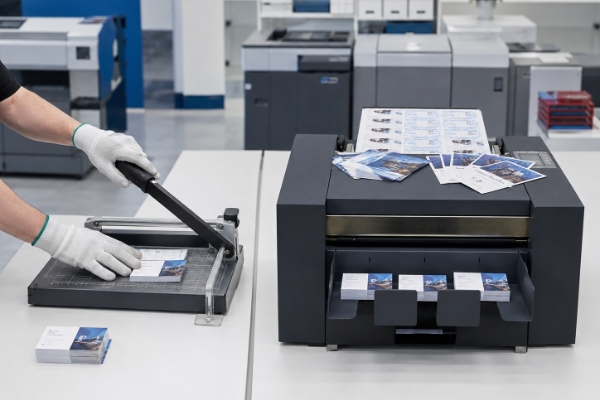
A manual business card cutting workflow uses a paper guillotine, rotary paper trimmer or similar tool to make a sequence of straight cuts. The operator measures or follows printed marks, aligns the stack, trims one direction, rotates the work and repeats. It is inexpensive and flexible for prototypes or a few sheets, but consistency depends on the operator, guide condition, stack movement and number of handling steps.
A manual business card cutter workflow also includes separating printed jobs, confirming orientation, removing trim waste, recounting cards and packaging each order. A skilled operator may achieve good results with stable stock and a maintained guillotine cutter. The limitation appears when several alignments and rotations must be repeated across many batches.
Manual equipment remains useful after automation is installed. It can trim a proof, correct an exceptional sheet or handle an unsupported one-off size. An upgrade should assign repeatable production to the most controlled process rather than attempt to eliminate every manual tool.
How an Automatic Business Card Cutter Changes the Process
An automatic business card cutter feeds printed sheets, performs longitudinal slitting and cross cutting, separates waste and collects finished cards. Vicut’s CC family uses preset layouts and interchangeable cutting cassettes; supported configurations also offer registration control. Automation does not eliminate setup. It moves effort toward correct imposition, stock preparation, template selection and quality checks.
This differs from adding a motor to a general paper cutter. A dedicated business card cutter machine coordinates automatic feeding, longitudinal cuts and lateral cross cutting around an imposed layout. The operator still chooses the preset, loads the matching slitting cassette where applicable and confirms the first output.
Print registration is conditional. Supported controls may compensate for certain placement shifts, but they cannot repair missing bleed, an incorrectly scaled PDF or unsuitable media. Automation improves a controlled process; it does not make upstream variation disappear.
Manual vs Automatic Business Card Cutter: Seven Factors to Compare
1. Order frequency
A small batch once a month may not justify a dedicated workflow. Similar jobs arriving every day make repeatability and reduced handling more important.
Record orders for several representative weeks. Count batches, sheets per batch, repeat customers and rush jobs. Ten jobs at one deadline may create a stronger need for automation than the same volume spread across quiet days.
2. Layout repetition
Automation is most effective when common card sizes and sheet impositions recur. If every job has a unique rectangular size, verify cassette and adjustable-cut options before assuming compatibility.
Group jobs by finished width and imposed layout. Determine which share fits quoted cassettes and which requires a change, customization or another device. This establishes whether an automatic cutter for repeat business card orders covers the main workload or only a small subset.
3. Quality risk
Count reprints caused by uneven margins, skew, mixed stacks or operator variation. A machine cannot correct an artwork file without bleed or unstable printer output, but a controlled automatic process can remove repeated manual alignment steps.
Measure finished size and image position at the first, middle and last sheets. Record whether errors arise during cutting or already exist in the print. Otherwise, a shop may automate and retain the same white-edge problem because its source is the file or printer.
4. Labor touchpoints
Record actual operator actions: measuring, cutting, rotating, sorting, removing waste and recounting cards. Do not convert those observations into a promised universal saving; labor impact depends on local order mix and staffing.
Include loading, first-piece approval, monitoring, clearing a feed error, emptying waste and final inspection. “Automatic” does not always mean fully unattended; evaluate the exact model with the real stack and job.
5. Material and print process
Test real coated and uncoated stocks, digital toner output, curl and static. Optional creasing or perforating should be confirmed for the exact model, tool and media rather than treated as standard across the range.
Include full-bleed, duplex and dark-background samples. Examine edge damage, toner cracking where creasing is required, feed marks and whether static disrupts card collection. The most difficult regular stock is more informative than an easy demonstration sheet.
6. Changeovers
Ask how long it takes to select a layout, change a cassette, clear waste and move between sheet sizes. A fast cutting cycle may still be inefficient if the daily schedule contains many unsupported changes.
Map the top ten jobs through file preparation, printer preset, paper loading, cutter preset, cassette or accessory, first-piece approval and cleanup. Standardizing these elements can improve productivity even before equipment changes.
7. Exceptions
Keep a manual trimmer for proofs, repairs and unusual one-off work. Consider a contour-capable sheet cutter for shaped cards or highly variable outlines instead of expecting a dedicated card cutter to do every task.
An ordinary business card slitter should not be presented as an irregular-shape die cutter. Separate rounded, shaped, perforated, folded and packaging-related work in the job matrix, then verify the correct model or alternative platform.
Business Card Cutter Cost Comparison Beyond Machine Price
Compare the complete configuration. Relevant items include cassettes and optional tools, software, freight and installation, training, routine consumables, spare parts, operator time, space, waste handling and support response. No generic ROI is credible without the shop’s labor cost, order mix, selling price, utilization and rework data.
Use a conservative internal test: record current touch time and waste for representative jobs, perform the same jobs during a demonstration, and include setup and inspection on both sides. The result is a local purchasing input, not a universal performance promise.
How to Choose a Business Card Cutter for Different Print-Shop Scenarios
Occasional in-house cards: retain a maintained manual cutter if quality is acceptable and volume is genuinely low.
Print shop with daily standard card orders: test an automatic cutter with the most common impositions. Evaluate first-to-last-sheet consistency, sorting and operator intervention.
Mixed short-run producer: use an automatic card cutter for repeatable rectangular products and keep a flexible cutter for exceptions. The most productive setup may be a combination, not a single universal machine.
Growing small print shop: a business card cutter for a small print shop is appropriate when recurring work already consumes staff time or misses deadlines, not merely because future orders are expected. Demonstrate current top jobs and identify a fallback for unsupported work.
When to Upgrade to an Automatic Business Card Cutter
Upgrade evidence usually appears in several places: repeated layouts form a meaningful share of orders; manual touchpoints delay other work; first-to-last-card consistency is difficult to hold; rush jobs compete for the same operator; and a sample test proves that the quoted configuration handles real stock.
Delay the purchase when order history is mostly one-off sizes, print variation remains unresolved, or the proposed cassette covers few regular jobs. Improving templates, printer presets, paper storage and manual procedures may be the better first step.
FAQ
Q1:What is the best machine for cutting business cards?
For recurring imposed business card orders, a dedicated automatic business card cutter is usually the most suitable. For occasional or unusual straight cuts, a maintained manual cutter may be more practical. Always test the actual layout and paper stock.
Q2:Which type of guillotine is best?
Choose a paper guillotine that safely supports the required sheet size, stock and batch, with a stable guide and reliable clamping. The best choice depends on workload and required consistency rather than the cutting mechanism alone.
Q3:What is the main difference between manual and automatic machines?
A manual cutter requires the operator to measure, align, cut and rotate the sheets. An automatic business card cutter feeds the sheets and coordinates longitudinal slitting and cross cutting around a preset layout.
Q4:What is the best paper cutter for making cards?
Use a dedicated card cutter for repeatable rectangular cards, a manual guillotine or rotary trimmer for occasional straight cuts, and a contour-capable cutter for shaped or highly variable cards.
 vicutcnc@cncvicut.com