Understanding the different types of paper cutters and trimmers begins with terminology. “Paper cutter” can describe anything from a desktop hand trimmer to an automated digital finishing system. These machines are not interchangeable. The useful question is not which cutter is best in general, but which cutting logic matches the input material, finished product, batch pattern and required operations.
Quick Comparison
Start with the VICUT product range to separate the equipment categories that are actually available from general industry terms.
| Type | Input and motion | Typical result |
|---|
| Manual guillotine | Sheet or small stack; lever blade | General straight cuts |
| Manual rotary trimmer | Sheet; rolling blade | Controlled light-duty straight trimming |
| Industrial stack cutter | Aligned stack; programmed straight cuts | High-volume rectangular sheet sizes |
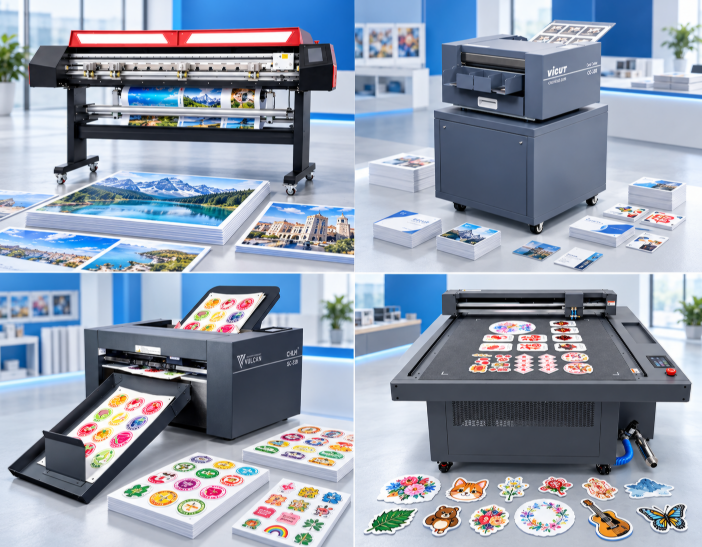
| Automatic XY trimmer | Roll media; longitudinal and cross cuts | Roll-to-sheet posters or printed panels |
| Card cutter | Imposed sheets; slitting and cross cutting | Business cards, photos, postcards, tickets |
| Autofeeding sheet cutter | Printed sheets; digital contour path | Labels, stickers, tags and selected light packaging |
| Static flatbed cutter | Individually placed sheet; digital path/tools | Prototypes, contours, creases and varied sheet work |
The first three are industry categories included for orientation; Vicut’s current product portfolio should not be described as selling those manual or industrial stack machines unless an official product page confirms it.
What Is the Difference Between a Paper Cutter and a Paper Trimmer?
The words overlap in the market. “Trimmer” often emphasizes finishing an edge or separating rectangular output, while “cutter” can include straight, programmed or contour operations. Those tendencies are not strict standards. A product name alone cannot tell a buyer whether the input is a roll or sheet, the path is straight or irregular, or registration and automatic feeding are included.
Translate every label into five questions: What enters the machine? How is material positioned? What path does the tool follow? What finished product leaves it? Which operations occur beyond cutting? This is more reliable than treating all paper cutters and trimmers as larger or smaller versions of the same device.
Manual Guillotine, Rotary Trimmer and Stack Cutter
A manual guillotine is flexible for proofs, office work and low-frequency straight cuts. A rotary hand trimmer provides a guided straight cut for lighter work. An industrial stack cutter processes aligned piles through programmed straight-cut sequences. None of these automatically provides contour registration, dedicated card separation or roll-to-sheet XY finishing.
They remain useful reference points because many print shops begin with manual straight cutting. A bottleneck appears when the operator repeatedly measures, rotates, aligns and sorts the same imposed work.
A manual guillotine makes a straight cut on one sheet or an appropriate small stack. It is flexible for proofs and occasional trimming, but the operator controls alignment and sequence. A rotary paper trimmer moves a blade along a guided rail for controlled light-duty straight trimming. Neither automatically imposes, registers or separates a multi-row card job.
An industrial stack cutter aligns and cuts a pile through repeated straight-cut programs. It differs from an automatic card cutter that slits and cross-cuts an imposed sheet and from a contour cutter that follows individual shapes. These distinctions matter when a buyer searches for a paper cutter for print shop finishing.
Automatic XY Trimmer for Roll-to-Sheet Output
An XY trimmer converts printed roll media into rectangular sheets by cutting along the web and across it. Vicut positions the TM160 as an automatic XY cutter with longitudinal and horizontal cutting, CCD mark reading and deviation correction. This workflow suits roll-printed posters, graphics or similar rectangular output.
XY trimming is not contour cutting. It follows straight X/Y paths and should not be presented as a substitute for a label cutter that follows irregular outlines.
A digital paper trimmer or automatic cutter for printed rolls should be tested with real roll width, print marks, image spacing, material behavior and output sequence. Confirm how longitudinal blades are positioned, how cross cuts are triggered, how deviation is corrected on the model and how sheets are collected. Posters and rectangular panels suit this logic; nested sticker outlines do not.
For roll-to-sheet rectangular output, compare the VICUT digital paper trimmer range before considering a contour-cutting system.
This also differs from roll label die cutting. An XY trimmer separates rectangular sheets, whereas a roll label finishing line may contour-cut labels and perform other web-finishing operations. Similar roll input does not mean identical output.
Card Cutter for Repeated Formats
A dedicated card cutter accepts imposed printed sheets and separates repeated rectangular products through slitting and cross cutting.
For repeated card workflows, review the VICUT card cutter range and then test the required layout. Vicut’s CC and PC range covers business cards, selected photos, postcards, tickets and related card formats, with the exact paper, layout and cassette scope verified by model.
This category is more specialized than a general trimmer. Its value comes from repeatable layouts, automatic feeding and organized output—not from unlimited shape flexibility.
For a machine for cutting business cards from sheets, match imposed rows and columns, finished widths, gutter, sheet size and paper to the quoted layout and cutting cassette. Verify front-edge or registration workflow by model. If a job contains irregular shapes, it no longer fits ordinary rectangular card slitting logic.
A dedicated photo cutter is a related specialization. It can use preset photo formats and a photo-oriented feeding and collection workflow. Compare real ID-photo and business-card jobs instead of treating every small rectangle as the same application.
Autofeeding Sheet Label Cutter for Contours
For registered contour work, review the VICUT autofeeding sheet cutter families before treating a general paper trimmer as a substitute.
An autofeeding sheet cutter loads preprinted sheets, reads registration information and follows digital paths. Vicut’s SC/VSC range targets labels, stickers and, on suitable tool configurations, tags or selected light packaging operations. QR-code job retrieval and camera registration can support mixed printed work on specified models.
The critical tests are registration on the real print, reliable feeding of the real stock, kiss-cut liner protection, full-cut piece control and the required tool combination.
A contour cutter for printed sticker sheets needs readable marks, a correctly matched file and stable media transport. Kiss cutting must separate face material without excessive liner damage. Full cutting must control separated parts and waste. When tags or light packaging add creasing or perforation, verify the exact tool configuration rather than assuming every automatic sheet cutter includes it.
Automatic feeding and contour cutting solve different problems. The feeder reduces repeated loading, camera registration aligns the path to print, and the tool follows the contour. A machine can perform one function without necessarily meeting all three requirements.
Static Flatbed Cutter
A static flatbed cutter holds or positions one sheet at a time and moves a tool along a digital contour. It can be a better fit for prototypes, irregular shapes, material trials or jobs that need close operator access. It is not the same production workflow as an automatic sheet feeder, and output depends on table size, hold-down, tools and material.
Static placement may help when material is difficult to feed, quantity is low or every sheet needs inspection. Repetitive stacks of validated label media may favor an autofeeding system. Compare real handling time and failure risk.
Dedicated Cutter or General-Purpose Platform?
A dedicated machine simplifies a repeatable workflow. An automatic XY cutter focuses on roll-to-sheet rectangles; a card cutter machine focuses on imposed cards; an autofeeding sheet label cutter focuses on registered contour work. A general flatbed offers broader paths and tools but may require more operator handling.
Neither approach is universally superior. High repetition favors a verified dedicated workflow, while high variation can favor flexibility. Many shops combine a production device for common work with a flexible device for prototypes and exceptions.
Five Workflow Scenarios
Trim occasional proofs: use a maintained manual trimmer if volume and quality requirements are modest.
Convert printed rolls into rectangles: evaluate an automatic XY trimmer.
Produce recurring business-card impositions: evaluate a dedicated card cutter.
Contour-cut stacks of printed stickers: evaluate an autofeeding sheet label cutter.
Make varied prototypes and irregular samples: evaluate a static flatbed cutter.
A print shop may need two complementary machines. Searching for one universal cutter can create more setup time and compromise than assigning repeatable jobs to a dedicated system and exceptions to a flexible one.
A Decision Tree for Paper Cutting Equipment
Printed roll input: if output is rectangular sheets, evaluate an automatic XY trimmer; if labels remain on a roll and follow contours, evaluate roll label finishing.
Imposed sheet of repeated rectangles: evaluate a card or photo cutter according to finished product and layout.
Stack of printed sheets with irregular contours: evaluate an autofeeding sheet label cutter.
Unusual, rigid, experimental or tool-intensive sheets: evaluate a suitable static flatbed.
Occasional straight trimming only: a compliant manual trimmer may remain sufficient.
Costs and Constraints to Compare
Include tools and cassettes, software, feeder and output capacity, setup, changeover, consumables, maintenance, training, waste handling, support and space. Compare tasks each configuration can complete; do not create ROI or capacity promises from generic category descriptions.
Media names also require caution. Paper,card,film and packaging include many coatings, thicknesses and structures. Official model limits and a successful sample on production media are both necessary.
Buying and Demo Checklist
Define roll, sheet or fixed-sheet input.
Separate straight rectangular cuts from contour paths.
List kiss cut, full cut, crease, perforation and plotting requirements.
Provide real PDFs and printed production media.
Record batch size, SKU count and daily changeovers.
Inspect registration, feeding, waste, output order and recovery after interruption.
Confirm tools, software, accessories, training and operator-maintenance scope by model.
Run the full process: file preparation, loading, registration where applicable, cutting, waste removal, collection and changeover. Inspect the first and last output and test recovery after a misfeed or rejected sheet. Request written confirmation of the model and accessories.
Frequently Asked Questions
Is an automatic XY cutter a contour cutter?
No. XY trimming uses longitudinal and cross cuts to produce rectangles. Contour cutting follows a digital outline around printed shapes.
Can a card cutter replace a stack cutter?
They solve different workflows. A card cutter separates imposed layouts; a stack cutter performs straight cuts through aligned piles. Compare real input and output rather than only volume.
Which cutter is suitable for sticker sheets?
For preprinted contour stickers, evaluate an autofeeding sheet label cutter with camera registration and verified kiss cutting. Simple rectangular separation may require another device.
Can one paper cutter process every material?
No. Construction, coating, thickness, rigidity, curl and static affect feeding and cutting. Verify official limits and test production stock.
Create a Production Requirement Sheet
Before requesting quotes, make one row per regular product. Record input format, printed dimensions, material, finished size and shape, straight or contour path, registration need, batch size, SKU changes, additional operations and output handling. Add the production PDF and retain a physical sample where possible.
Send the same requirement sheet to every supplier. This makes quotations comparable and exposes exclusions. One supplier may quote a base machine while another includes software, stand, feeder, camera, cassette or tools. Category-level price comparisons without configuration detail can mislead.
Test edge cases deliberately: the smallest item, longest cut, darkest or most reflective print, most curled sheet, sensitive liner, thickest approved card and a mixed-job changeover, as applicable. The purpose is to locate the operating boundary before purchase, not force a machine through unsupported media.
Finishing begins before the cutter with imposition, marks, printer scaling and material conditioning. It ends with waste removal, sorting, counting, packaging or rewinding. A machine that cuts correctly but creates a difficult output pile may leave substantial manual work.
Final Selection Summary
Choose by the dominant transformation: straight manual trimming, programmed stack cutting, roll-to-sheet XY separation, repeated card slitting, registered sheet contour cutting or flexible flatbed work. Then verify material, configuration and the complete workflow. This answers user intent more accurately than treating every paper cutting machine as interchangeable.
Start from the finished product: roll-to-sheet rectangles point toward an automatic XY trimmer; repeated cards toward a card cutter; stacked contour labels toward an autofeeding sheet cutter; and variable one-off contours toward a suitable static flatbed. A sample test remains the final proof.
 vicutcnc@cncvicut.com